Category Archives: Information

Cameleon 2.0 Makes it Easy to Live Stream on Facebook


Cameleon logoCameleon 2.0 is a simple broadcasting tool that enables people to connect any live camera to YouTube, Facebook, Twitch (and more) for the easiest live content creation. It makes it easy for you to start live streaming.

Download Cameleon and use it with your Mac, Windows PC, iPhone, or Android with built-in camera. It is also possible to use Cameleon by attaching it to any USB WebCam, GoPro Hero, or IP Camera. Cameleon is a new kind of media-server that uses your devices own resources – and does not use the cloud. It has less than 1% CPU usage per camera. It offers HD, high frame-rate, two-way sound, and “all the bells and whistles”.

Cameleon 2.0 is for people who want to start live streaming on either YouTube Live or Facebook Live Video. Some think that Facebook is interested in featuring live streamed videos by giving them prime placement.

Cameleon is on Kickstarter and has 55 days left to go (at the time I am writing this blog). The Kickstarter page has directions (with images) that show you how to download and begin using Cameleon.

On the Kickstarter page, creator Kalman Venczel says they were able to create Cameleon (and offer it for free) because they had passive income to maintain their lives while they worked unpaid on it for years. The Kickstarter was necessary because their short-term freelance jobs were slowing them down on the creation of Cameleon 2.0.

Line 6 Helix Software Editor Released


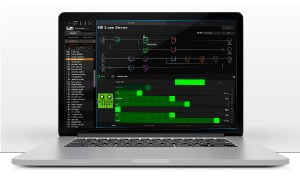
Helix EditMusical instrument and audio equipment manufacturer Line 6 made waves in the guitar gear field when the company released the Helix processor last year. The Helix is Line 6’s first next-gem level processor, packed with high-end hardware and software designed to give guitarists access to the best possible tones.
The Helix processor itself comes with one of the industry’s largest built-in displays. But Line 6 promised it would release a computer-based application guitarists could use to create and edit Helix patches. (This follows suit with other Line 6 products that have also had their own computer-based editors.) When Helix units first shipped, the software editor was not yet available. Making good on its promise, Line 6 has now delivered its computer-based software editor for the Helix. From an e-mail sent today by Line 6:

Drag and drop amps, cabs, and effects to build complex signal chain
Quickly reorganize, rename, edit tones, and modify footswitch labels

Visualize every detail of your tone editing workflow on your computer

The Helix Edit application is a free download from the Line 6 website. In order to find it, go to the software download page, select “Helix” from the products menu, leave the software menu set to “All software,” select the appropriate OS for your computer from the operating system menu and then check the “Beta” box on the right before clicking the Go button. The Helix Edit software will come up as the first downloadable item on the next page.


SportPod Is a Monopod For Smartphones, Tablets, and GoPros


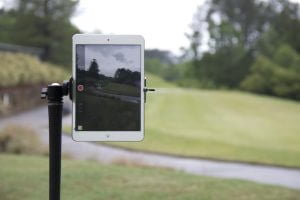
SportPodWhether it’s for personal use or as part of a large-scale production, getting the right shot is crucial to any video. But if you’re in a situation where set up time is at a minimum, you don’t want to be strapped down with loads of gear that will require a lot of time and energy in the teardown/set up process. What if getting the perfect shot for the next scene was as simple as putting a small pole into the ground, mounting and adjusting your camera, and pressing record? That’s exactly what the SportPod is designed to do.

The inspiration for SportPod is right in the name. SportPod’s inventor wanted to find an easier way to record his own golf swing so he could analyze the footage to make improvements in his game. SportPod could certainly be used for a lot of different sports-related activities. But given its ease of use and adaptability, videographers across the board will likely find plenty of good uses for SportPod.

SportPod is a monopod (as opposed to tripod) that can be adjusted from two to four feet off of the ground. It comes with a ball mount that can be used with smartphones, tablets, GoPros, and most point-and-shoot cameras. This mount offers a 360-degree range of motion, making it easy to get the right shot in the moment. SportPod is easily broken down so it can be moved quickly from one location to the next.

The inventor of SportPod is running a Kickstarter campaign to get the device into production. The campaign is about 30% funded with 22 days left to go. Pledges starting at $35 entitle backers to a SportPod with smartphone attachment. Prices go up from there, depending on what type of SportPod attachments you’d like to use.


Periscope Adds Drone Integration And More!


Periscope logoPeriscope has announced some updates that will be launched in the coming weeks. The updates add some exciting new things that you can do with Periscope.

You will soon be able to do a Periscope broadcast from a supported DJI drone. Connect your iPhone to your drone’s remote, and Periscope will automatically pull in your drone’s video feed.

In addition, you will be able to switch between the video from your drone, your iPhone front and back facing cameras, and your GoPro. During your broadcast, you can narrate from a bird’s eye view using your phone or even use the Sketch feature to drawn on your screen and point things out.

Another update will let you add #save to your broadcasts to keep them beyond 24 hours. The goal here is to give you full control of your broadcasts. After this update rolls out, your broadcasts will be automatically saved on Periscope and Twitter with all their comments and hearts.

You can delete your broadcast any time you want to in the post-broadcast screen or in your profile. Those who want their broadcasts to be removed after 24 hours still have that option and can configure it in their account settings.

Periscope also be adding a way for people to search for broadcasts that they are interested in. Tap on the search button and you will see a Global List of suggested topics to search for. It relies on hashtags. For example, #music would show you Periscope broadcasts about music. You can add #music to your own broadcast that is music related, too.

Periscope is adding two special topics that people can search for. One is “First Scope” which is where you can welcome new broadcasters to the community. The other is “GoPros and Drones”, which is where to find broadcasts with GoPros and drones.


GoPro Mobile Creative Suite Makes Editing Simple


GoPro logoGoPro had previously announced the acquisition of two leading mobile video editing apps: Replay and Splice, to deliver ultra-convenient and powerful mobile editing solutions to GoPro and smartphone users worldwide.  On May 3, 2016, GoPro presented the new mobile creative suite of Quik and Splice, two creative tools that help manage, edit, and share all of the content from your GoPro cameras and mobile devices.  These two apps make up GoPro’s Mobile Creative Suite.

Quik mobile appQuik helps you make beautiful videos with just a few taps. It is the fastest and easiest way to create awesome videos from your GoPro or smartphone footage. It offers automated simplicity. Splice brings desktop editing software power that is perfected for your mobile or tablet. No matter your skill, Quick and Splice enable you to edit like a pro.

Use Quik to turn your photos and clips into incredible videos perfectly edited to your chosen soundtrack. Quik automatically analyzes your footage to find the best moments, add beautiful transitions and effects, and syncs all of it to the beat of the music.

Choose from 28 unique video styles, each with unique filters, transitions, graphics, and font. You can add custom text overlays, title slides, and emojis. Pick a song from Quik’s diverse library of great music or use a song from your own library. Every Sunday, Quik surprises you with ready-to-watch videos made from related moments on your mobile device.

Splice mobile appSplice gives you more manual control. It puts the power of a professional desktop editor at your fingertips, allowing you to choose your favorite moments and customize your video. You can pick your transition style, trim clips, add filters, show off an epic shot in slow-mo, and more. Splice works great with photos, too.

Use one of the huge variety of free soundtracks that Splice offers, or use a song from your iTunes library. Trim and mix multiple tracks, and adjust the volume to fine-tune the audio. You can add sound effects or narrate the video with the built-in voice recorder.


NewTek Brings NDI Technology to Adobe Creative Cloud


NewTek LogoLast fall, NewTek, the Texas-based hardware/software developer renowned for its media and broadcast products, announced the launch of its new NDI protocol for transmitting video over digital networks. Since then, NewTek has been working with third parties to help expand the adoption of NDI. Last month, NewTek announced it would bring NDI to Adobe’s Creative Cloud family of applications and services:

The NDI integration enables users of Adobe Premiere Pro CC, Adobe After Effects CC and other Adobe Creative Cloud applications to send real-time video and audio to any NDI-enabled receiving product, such as production switchers or capture cards, across a standard Ethernet network. With NDI for Adobe Creative Cloud, creators and producers can significantly accelerate their pre- and post- production pipelines, bypassing rendering and uploading of creative elements for a faster, more efficient delivery for content review and approval. It also allows teams in different locations to work together in one interface in real-time, making creative decisions collaboratively—and saving valuable time in the process.

NewTek’s NDI plugin for Adobe Creative Cloud is available thru a $9.99 monthly subscription from the NewTek Store. The NDI protocol itself is now available as a royalty-free software developer kit for any company looking to establish IP workflows within their organization, or in production tools and systems they manufacture.


Interactivity Will Be Focal Point of ATSC 3.0


ATSC LogoATSC 3.0, the new standard that will soon be launched by the Advanced Television Systems Committee, will be more than just a protocol for the transmission of audio and video to viewers. ATSC 3.0 will also have an interactive side that could foster a new wave of app development for both terrestrial and online broadcasters. ATSC 3.0 will allow viewers to have experiences with their TV sets that are close to what they’re already getting with smartphones and tablets.

This interactivity comes courtesy of ATSC 3.0’s compliance with W3C standards for internet communication. Developers will be able to create apps that can now run in a web browser. This offers a wide range of potential opportunities for broadcasters and content producers. For example, if viewers are watching a news broadcast, developers using these new standards could create apps that aggregate related news items alongside the broadcast. Programs that include viewer polls or voting systems could benefit by building those interactive features right into their apps, instead of asking viewers to call an automated phone system or visit a website. ATSC 3.0 will also make it easy for viewers to opt into targeted commercial and marketing offers.

The rollout of ATSC 3.0 and its interactive components will take place later this year. The upcoming 2016 ATSC Annual Broadcast Conference is being billed as the “Countdown To Launch” of ATSC 3.0. The conference will host a series of events relevant to the release of this new broadcast standard.


The Leica M-D is Simplicity Personified


Leica M-DLeica has revealed the Leica M-D. It is described as a camera that offers no more and no less than the most important features. It also represents a state-of-the-art digital rangefinder.

The Leica M-D (Typ 262) is the first serial production model of the digital M family to be made without a monitor screen. The usual location of the screen on the back of the camera is now taken by the ISO sensitivity setting dial – one of the few, but essential, features of the camera.

Although the Leica M-D embodies the entire range of technical advantages perfected over decades in the Leica rangefinder system, it intentionally omits all but the most essential technical features. It has been radically reduced to the most important parameters required for photography – shutter speed, aperture, distance, and ISO sensitivity. This purist style helps the user focus his or her concentration on what is most essential: the picture.

The Leica M-D expresses purely functional, formal clarity and features design characteristics such as a top plate in brass with a step at the end citing the design of the Leica M9. The Leica red dot logo has been omitted from the front of the camera in favor of its unobtrusive appearance.

In addition to it’s purist looks, the hardly audible shutter of the Leica M-D guarantees maximum inconspicuousness when shooting. As an aid to this, the camera features a shutter cocking system that is particularly quiet in single exposure and enables a shutter release frequency of up to two frames per second. In continuous mode, the M-D has the same sequential shooting speed as its sister model and shoots up to three frames per second.

The Leica M-D is now on sale. The camera package also includes a real-leather carrying strap in full-grain cowhide.


Mevo Is the 4K Live Event Camera


Mevo cameraSometimes the best practice for capturing a live event is to have multiple cameras. But setting up these kinds of shoots can require lots of extra (not to mention costly) equipment. It can also be technically challenging to set up a multi-cam rig, as different manufacturers and models may have their own requirements for audio-video connections that may or not match each other. Could it be possible to deliver a robust multi-angle video presentation that uses only one camera? The new Mevo camera proves that this is indeed possible.

Mevo is a 4K camera that is controlled with an attendant iOS app. The app allows users to select specific sections of a live video and then “cut” to those sections as closeups, creating a multi-cam experience for the viewer. Filming a concert and you’d like to cut between a wide shot of the stage along with closeups of invidicual players? No problem. Just tap on one of the performers in the Mevo iOS app and the camera does the rest for you, switching seamlessly from the wide shot to the closeup.

Mevo makes it easy to cover remote events. The camera can stream over Wi-Fi or LTE internet connections. Mevo can also be connected via USB to a host device such as a laptop computer for further processing. Mevo is compatible with Livestream and Facebook Live right out of the box. Mevo is available for preorder at a special price of $299. That includes a $100 discount that expires once the preorder period ends.


EVE Audio is Giving Away a Desktop Monitor System


EVE Audio giveawayEVE Audio is a company from Berlin, Germany, that makes professional studio monitor speakers. It was founded in 2011 by Roland Stenz, who is described on the Eve Audio Facebook page as “a long-time aficionado for quality audio with a long background history in the audio industry.”

EVE Audio is turning five years old in May of 2016. To celebrate, they are doing a giveaway Someone will win a new EVE SC302/TS107 Desktop Monitor System. You can enter the giveaway on the EVE Audio giveaway website. You can register through Facebook or email.

The EVE SC203 has a small footprint and a big sound. It is the perfect solution for professional desktops with a limited amount of physical space. Each speaker is provided with the FlexiPad, a v-notch shaped orange rubberized pad that allows you to decouple the speaker from its base and angle it precisely at 0°, at 7,5° or 15°.

Features of the EVE SC203 include:

* New µA.M.T. Ribbon tweeter & 3” woofer

* Dedicated 30W PWM amplifier per driver

* 24bit/192kHz converter and DSP control

* Switchable satellite filter for subwoofer

* RCA analog, Optical and US digital inputs

* Rear passive radiator for extended lows

The EVE TS107 is also called a Thunderstorm (TS). It is a 7” subwoofer. All of their subwoofers feature the powerful accurate and low distortion sound reproduction that is the hallmark of all EVE Audio studio products.

Features of the EVE TS107 include:

* Down-facing suspended passive radiator

* Frequency response from 36Hz to 300 Hz

* Variable filter frequencies

* Switchable satellite filter & phrase control

* Built in limiter

* RCA (unbalanced) & XLR (balanced) inputs

* Remote control for system & sub volume

The official rules of the giveaway state that it is open to residents of the United States. Everyone who enters receives one entry. You can refer your friends and share on social media to earn bonus entries. Odds of winning depend on the number of eligible entries received.