Category Archives: Information

Slick Stabilizer Is A Motorized Camera Steadycam


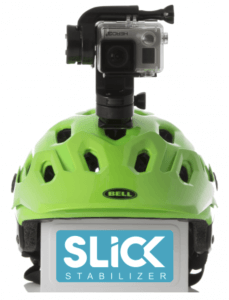
Slick StabilizerNobody likes watching video that’s bouncing and jerking around the frame. Some cameras come with built-in stabilizers to try and solve the problem. But those kinds of stabilizers can only do so much. There are high-end solutions like the Steadicam harness. But they’re very expensive and require special training to operate. Wouldn’t it be great if there were a middle ground between these two solutions? That’s where the new Slick Stabilizer comes in.

Slick Stabilizer is compatible with GoPro cameras. Using standard GoPro mounts, users can attach Slick to any of their favorite accessories – like a helmet, a pole, a dog, a chest mount, a drone, or even a surfboard. Slick is also the world’s first waterproof stabilizer. Slick can be used with water sports like surfing, sailing, kayaking, and kitesurfing. Here’s how Slick works:

SLICK uses motors and sensors: each of the camera’s motorized three axes is driven by a micro-controller, so that the camera stays perfectly level regardless of the kind of terrain you’re moving on.

SLICK is compact and very simple to use:

1) Attach your GoPro camera to SLICK

2) Attach SLICK into your favorite GoPro mount — they are all compatible

3) Switch it on and kick off the action!

Slick was launched thru a successful Indiegogo campaign. The product is currently in development and Slick’s designers are hoping to unveil a prototype soon. It’s still possible to preorder a Slick thru the Indiegogo page at an early bird price of $229.00.


Line 6 Releases Mobile POD 2.0 for iOS


Line 6 LogoMusic and audio equipment manufacturer Line 6 revolutionized the guitar effects industry with the release of its POD effects processor nearly two decades ago. The company hasn’t stopped innovating since. When it was clear that iOS, the operating system that runs Apple’s mobile devices, could be used for more than just placing phone calls and sending text messages, Line 6 began developing a special POD-inspired app for iOS. Hence, the Mobile POD app was born. Mobile POD was recently updated to version 2.0.

The app comes packed with 65 classic amps and effects for dialing in the perfect guitar tone, Users can save preferred custom tones or choose from presets designed by Line 6 engineers. Updated UI combines ease of use with fast interaction, and features a dynamic layout that adapts to any iOS screen. Updated ergonomics offer immediate on-screen access to all parameter settings while simultaneously allowing for precise editing with a single finger.

With Mobile POD 2.0 and an iOS device and it becomes possible to practice, jam, or record anywhere. Need to lay down some guitar tracks at 2AM without waking the neighbors? Maybe head out into the wilderness (or just the backyard) to do some inspired composing? It’s all possible with this app from Line 6.

Mobile POD 2.0 is available as a free download from the App Store. To unlock all of the app’s features, a $19.99 in-app purchase is required.


Lauten Audio Introduces Series Black LA-320 Microphone


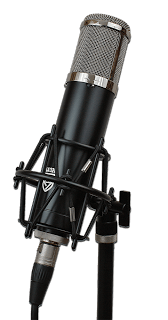
Lauten Audio Series Black LA-320Lauten Audio has introduced the Series Black LA-320. It is a large diaphragm vacuum tube condenser microphone that is professional and versatile. It is good for studio and vocal recording.

The Series Black LA-320 features a 1” gold sputtered diaphragm with cardioid polar pattern, dual-triode vacuum tube, 120 Hz low-cut filter, 12 kHz high-cut filter, and transformer balanced output. The low-cut filter helps reduce boomy lows or low-end rumble; the high-pass filter helps to tame the bright sources.

These features are designed to help people achieve excellent recordings regardless of their skill level. The Series Black LA-320 is the best entry into professional quality recordings with a tube microphone. It come fully equipped to get you recording with great results.

Each microphone includes a classic inspired spider shock mount to isolate the microphone from vibrations, a quality 5-pin microphone cable, custom, stable, dedicated power supply with a selectable mains voltage for use in all countries (100, 115v, 230v etc.), and a durable hard case to keep your microphone safe and clean when not in use.

Technical Specifications:

* Type: 1 inch dual large diaphragm pressure gradient transducer microphone

* Polar Patterns: Cardioid

* Circuit: Vacuum tube with transformer balanced output

* Frequency Range: 20Hz – 20KHz

* Dynamic Range: 120dB minimum

* Impedance: < 200 ohms

* Max. SPL: 0.5%THD@1000HzL 13odB

* Self-noise Level: <17dB-A

* Sensitivity: 14mV/Pa (@ 1kHz, 74 dB SPL)

* Special Features: Selectable, independent 120 Hz low-cut & 12 kHz high-cut filters

* Connector: 5-pin XLR (PSU to microphone) and 3-pin XLR (PSU to Preamp)

* Power Requirement: Custom power supply (Switchable 100v to 240v compatible range)

The Series Black LA-320 comes with a 1 year limited warranty from the date of sale from authorized dealer/distributor. Items limited to 90-days coverage include shock mounts, shock mount bands, cases, boxes, cables, microphone bags, and vacuum tubes. The Series Black LA-320 is $799.00 MSRP.


Blackmagic Design Announced New OS System for URSA Mini at NAB 2016


URSA Mini Heads Up Display Blackmagic DesignBlackmagic Design announced a major new camera operating system for its URSA mini cameras. This new camera OS features an incredible new user interface along with dozens of new features. Blackmagic Design demonstrated the new URSA Mini camera OS beta at NAB 2016.

The new URSA Mini camera OS is not just an upgrade, it’s a total rewrite from the ground up. The new OS has been specifically designed for the high performance processing architecture of URSA Mini and delivers a much more responsive experience, along with an entirely new user interface that makes using the URSA Mini faster and more intuitive than ever before.

The first things customers will notice is the incredible new user interface and heads up display which dramatically reduces the number of menus and submenus needed to find specific settings and commands. Customers can now quickly change settings such as ISO, white balance, shutter angle, iris, frame rate, frame guides and more without ever having to navigate through any menus.

In addition, there are now custom white balance and white balance presets, along with tint control settings. Customers also get more accurate shutter angle selection, including a large easy to use on screen keyboard for easy entry of settings. When entering the shutter angle, the new URSA Mini camera OS will even offer smart flicker free shutter angle suggestions to the camera operator.

Entering metadata on cameras has always been tedious. The new URSA Mini camera OS solves the problem of tedious metadata entry by giving customers an entirely new metadata entry page with predictive entry suggestions and a preloaded dictionary of commonly used terms that can be applied as metadata tags with a simple tap.

The new URSA Mini camera OS adds 1.33x and 2x anamorphic de-squeeze previews, along with the ability to double tap so customers can pan and zoom around the preview on the built in display. Customers can now import and store external 3D LUTs and apply the LUT to the LCD, and front and main SDI outputs independently. They can also load and save their own presets for different shooting setups or different operators.

In addition, customers can now assign shortcuts to camera function keys, toggle between peaking and color focus assist, see new percentage based safe area guides and have the ability to toggle SDI overlays with information specifically geared toward either the cinematographer or the director viewing at video village.

The Blackmagic URSA Mini camera OS will be available later this year as a free update for all Blackmagic URSA Mini customers. The URSA Mini camera OS beta was demonstrated at booth SL217 at NAB 2016.


Blackmagic Design Announces Desktop Video 10.6.4 Update at NAB 2016


Blackmagic Design LogoBlackmagic Design announced Desktop Video 10.6.4. Update which adds support for HDR playback over HDMI to UltraStudio 4K Extreme and DeckLink 4K Extreme 12G. Blackmagic Design demonstrated Desktop Video 10.6.4 at NAB 2016.

Desktop Video 10.6.4 Update adds playback support for HDR content over HDMI to UltraStudio 4K Extreme and DeckLink 4K Extreme 12G. The new HDR features include HDR metadata transport and support for the Rec. 2020 color space over HDMI. This means customers now get full support for monitoring on HDR capable displays using a single HDMI cable, making it ideal for editor and colorists working on HDR projects with DaVinci Resolve 12.5.

HDR, which stands for high dynamic range, is part of the new Ultra HD Premium standard so customers can now get big screen, low cost consumer televisions that support a massive range of color, peak brightness of up to 1,000 nits, which is 10 times brighter than most HDTVs, and incredible contrast ratio.

This means that colorists and editors working in DaVinci Resolve 12.5 with UltraStudio 4K Extreme or DeckLink 4K Extreme 12G will now be able to monitor images that are more true to life and more closely resemble the color and dynamic range of the latest cinema technology.

Features include:
* Adds support for Rec. 2020 color space output over HDMI
* Adds support for HDR metadata transport over HDMI

Desktop Video 10.6.4 Update is now available for free download from the Blackmagic Design website. Blackmagic Design demonstrated the Desktop Video 10.6.4 Update at booth SL217 at NAB 2016.


Blackmagic Design Introduced Two New Micro Converters at NAB 2016


Blackmagic Design Micro Converter HDMI to SDIBlackmagic Design introduced two new, super small, broadcast quality video converters at NAB 2016. They are the Blackmagic Micro Converter SDI to HDMI and the Blackmagic Micro Converter HDMI to SDI. Both were demonstrated at NAB 2016.

The Blackmagic Micro Converter SDI to HDMI converts signals from professional broadcast equipment such as cameras, decks, switchers and routers, and converts it into HDMI so customers can monitor video using big screen televisions and projectors.

The Blackmagic Micro Converter HDMI to SDI model lets customers connect their HDMI equipment, such as laptop computers, gaming consoles, and consumer video cameras, to professional broadcast equipment.

Blackmagic Design Micro Converter SDI to HDMIBoth models feature full size HDMI and professional 3G-SDI connections with all SD and HD formats up to 1080p60. Unlike other small video converters, Blackmagic Micro Converters feature the highest quality broadcast technology, miniaturized into a proper metal enclosure. Customers get the same broadcast quality 10-bit video processing found in full size converters.

In addition, Blackmagic Micro Converters also have SDI re-clocking on the 3G-SDI input which regenerates the SDI video input, reduces SDI jitter and improves SDI eye pattern before the signal is processed. This allows longer cable lengths and makes them incredibly reliable for use in professional broadcast.

Blackmagic Micro Converters are powered via the same micro USB connection that’s used on smartphones so consumers can use the included DC plug pack, any USB device, or even a smartphone charger to power to converters. The included external power supply supports 110 to 240V AC and comes with 4 different AC socket adapters so customers can plug them into outlets anywhere in the world. That means they can be run from the external power supply, or even over USB from things such as big screen televisions or laptop computers if there are no AC wall outlets available.

Blackmagic Micro Converters are available now for US $85 from Blackmagic Design resellers worldwide. Both models are being demonstrated at booth SL217 at NAB 2016.


Blackmagic Design Announced New DeckLink Duo at NAB 2016


DeckLink Duo 2 Blackmagic Design
Blackmagic Design
announced DeckLink Duo 2, a new high performance capture and playback solution with 4 independent channels that can be assigned to either record or playback in any combination, all on a single plug in PCI Express card. Blackmagic Design demonstrated the DeckLink Duo 2 at NAB 2016.

Designed for developers and OEMs, DeckLink Duo 2 is the idea solution for media play-out servers, multi screen digital signage servers, real time processors and more.

The new model DeckLink Duo 2 features 4 independent 3G-SDI connections so it can now work in high HD frame rates and it supports SDI formats in SD and HD up to 1080p60. Each SDI connection is completely independent, meaning that each of the 4 connections can input or output entirely different video standards and content streams, all at the same time.

DeckLink Duo 2 can also capture and develop playback at the same time, and also includes a reference connection for black burst/tri-sync. Developers can use the SDK to configure the four SDI connections to be any combination of inputs and outputs.

Featuring high performance 4 lane Generation 2 PCI Express, DeckLink Duo 2 takes up only one single PCI slot in the computer, which makes it the perfect solution for system integrators and developers that need completely customizable, flexible, I/O configurations on a single card.

The DeckLink Duo 2 appears as 4 independent SDI cards to the host computer, even though it only uses a single PCI Express slot and is ideal for use in servers that need to handle multiple video streams for both simultaneous capture and playback.

The DeckLink Duo 2 is available now for US $495 from all Blackmagic Design resellers worldwide. Blackmagic Design is demonstrating the DeckLink Duo 2 at booth SL217 at NAB 2016.


Blackmagic Design Announced Public Beta for DaVinci Resolve at NAB 2016


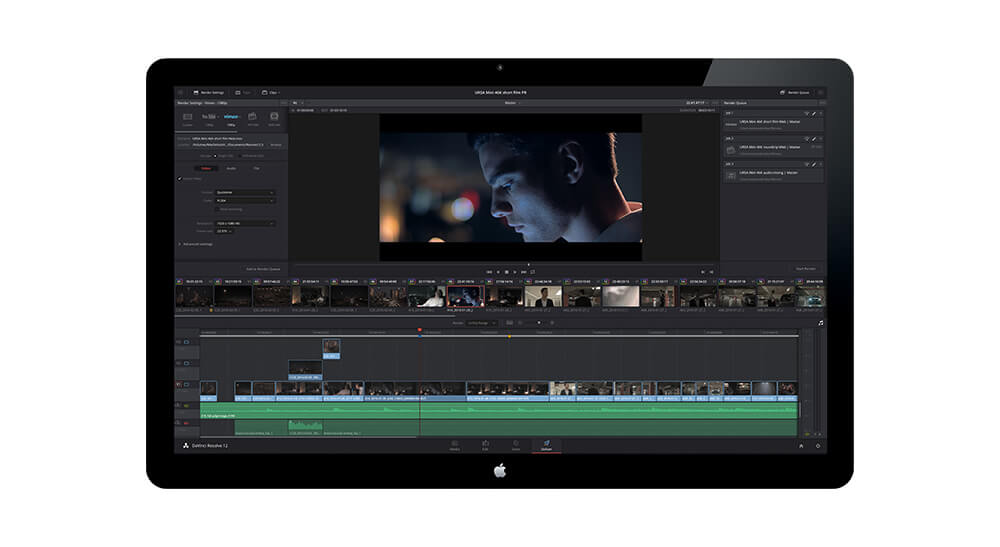
DaVinci Resolve 12.5 Blackmagic DesignBlackmagic Design has announced the availability for immediate download of the public beta for DaVinci Resolve 12.5. It was designed to make it easier for professional editors and colorists to work faster and have more creative options than ever before. Blackmagic Design demonstrated it at NAB 2016.

DaVinci Resolve 12.5 is a massive update with over 1,000 enhancements and 250 new features which includes major additions to the editing toolset, new and enhanced color features, including improved HDR support, and powerful new effects. DaVinci Resolve 12.5 adds dozens of new editing and trimming features such as the new swap and shuffle edits, seven entirely new trim operations, paste inserts, an expanded edit overlay with ripple overwrites and append edits, and much more.

In addition, timeline performance has been greatly improved so editing is faster and the new Camera Viewer option plays video full screen, making it easier for customers to preview their cut on laptops or systems with a single display.

DaVinci Resolve 12.5 introduces an entirely new way to navigate clips using audio waveforms. The source view features a revolutionary audio waveform overlay that allows you to see the audio waveform and video clip at the same time. This is the fastest way to navigate to different parts of a clip based on spikes, silent areas, or other visual cues in the audio waveform.

A new metadata keyword dictionary makes it easier to choose common or previously created keywords and quickly apply them to clips. Metadata can now also be imported or exported via CSV files. Media Pool metadata columns can also be customized and saved, colors can be assigned to specific clips, and markers can now be single frame or durational.

Display names, which hare used throughout the software, can be automatically created based on metadata tags such as scene, shot, and take information, saving editors hours when importing and working with large amounts of footage. New Power Bins in the Media Pool allow sharing of content between projects, making them perfect for graphics, stock footage, and sound effect or music libraries that are used across multiple projects.

The timeline curve editor has been improved so customers can now select, move, and edit groups of multiple keyframes at the same time. There are also new visual controls for adding or selecting keyframes, as well as a menu for selecting parameters and curves to edit.

For colorists, DaVinci Resolve 12.5 introduces major enhancements to the node editor so now it’s possible to quickly navigate between nodes, swap nodes, select multiple nodes with a lasso, copy node contents, extract nodes, use embedded alpha channels in mattes and more. When dragging a saved grade from the gallery, customers now have the option to drag the grade in as a single compound node or as a fully expanded node tree.

The public beta of DaVinci Resolve 12.5 and DaVinci Resolve 12.5 Studio are now available for download from the Blackmagic Design website free of charge for all current DaVinci Resolve customers. Blackmagic Design has been demonstrating it at booth SL217 at NAB 2016.

Blackmagic Design Announces Blackmagic Video Assist 4K at NAB 2016


Blackmagic Video Assist 4KBlackmagic Design announced Blackmagic Video Assist 4K, a portable all in one professional monitor and video recorder that can be used to add professional recording and monitoring to any SDI or HDMI camera. They will be demonstrating it at NAB 2016.

Blackmagic Video Assist 4K features a bright, high resolution 7 inch monitor for checking focus and framing, two high speed recorders for non-stop HD and Ultra HD recording, two extremely high quality XLR microphone inputs for professional audio recording, a built in speaker, and more.

The Blackmagic Video Assist 4K is perfect for customers that need better monitoring and higher quality recording. It works with every type of camera from DSLRs to older tape based camcorders, and even the latest digital film cameras.

Blackmagic Video Assist 4K features two built in high speed UHS-II recorders that work with the latest high performance SD cards, making them fast enough to record Ultra HD video up to 2160p30 on widely available, inexpensive, SD cards. Files are saved as broadcast quality 10-bit 4:2:2 video in either ProRes or DNxHD formats, making them compatible with all popular editing software. You can start editing immediately without having to transcode or convert files.

Recording can be triggered to start and stop using LANC or over HDMI or SDI from the camera. With two built in recorders, customers get non-stop recording because when one card is full it automatically continues onto the next. The new high speed SD cards are compatible with existing SD card readers so they can be mounted directly on a computer for cloning and backup using the DaVinci Resolve software.

Blackmagic Video Assist 4K features two mini XLR inputs with 48V of phantom power so customers can attach external microphones. This totally eliminates the problems with auto gain controls on DSLR cameras. Sound is recorded into the same file as the audio, so customers don’t have to worry about AV sync between separate audio and video files.

The Blackmagic Video Assist 4K features a bright, 7 inch high resolution 1920 x 1200 monitor and touchscreen with a wide 135° viewing angle. The extra resolution of the screen lets customers view 16:9 sources and see critical status information without covering the image. The display is also a touchscreen that lets customers tap and swipe gestures to display camera information, change settings and evaluate audio and video levels.

For power, Blackmagic Video Assist 4K features two standard LP-E6 battery slot that allow hot swapping of batteries while in use, and it can be powered using the 12V DC input. The batteries are discharged serially, so only 1 is used at a time.

The Blackmagic Video Assist 4K is available now for US $895 and will be demonstrated at booth SL217 at NAB 2016.


Blackmagic Design Announces New Blackmagic 3G-SDI Arduino Shield at NAB 2016


Blackmagic 3g-SDI Arduino ShieldBlackmagic Design has announced the new Blackmagic 3G-SDI Arduino Shield, which lets customers build their own custom controllers for cameras and other SDI devices. It allows broadcast engineers to integrate Blackmagic Design cameras into their own custom systems by using this new SDI expansion board. They will be demonstrating it at NAB 2016.

Arudino is a popular open-source electronics prototyping platform based on easy to use hardware and software. Similar to Raspberry Pi, which is more targeted at software engineers, Arduino is often the choice for hardware developers and is designed as a simpler, more flexible and lower cost way to build all kinds of custom projects.

Expansion boards are called “shields” in the Arduino world and Blackmagic Design decided to take advantage of this standardized expansion capability to build its Blackmagic 3D-SDI Arduino Shield interface card. Blackmagic Design has also written some sample code that shows how the Arduino communicates with the Blackmagic 3G-SDI Arduino Shield, and how the shield will then send the camera control commands to the camera.

The Blackmagic 3G-Arduino Shield is a simple expansion board or “shield” that includes 1 SDI input and 1 SDI output. The SDI input allows any video source to be connected, and the SDI output is connected to the camera and has camera control protocol commands embedded into it. The Blackmagic 3G-SDI Arduino Shield is very easy to use by a software developer, as they just look up the camera control commands they want to use in the instruction manual and then add them to the Arduino software code that sends them to the Blackmagic 3G-SDI Aurdino Shield to be inserted into the SDI link.

The Blackmagic SDI Control Protocol uses the blanking space in an SDI data stream to send commands for things such as camera and lens control, color correction, program return, tally, talkback, and more over SDI cables so customers don’t have to deploy additional, expensive equipment and run extra cables. The protocol is well documented and is now also being supported by third party manufacturers. The Blackmagic SDI Control Protocol is built into Blackmagic cameras, ATEM switchers, DeckLink cards, Video Assist, and viewfinder products.

The Blackmagic 3G-SDI Arduino Shield will be available mid year for US $95 from Blackmagic Design resellers worldwide. Blackmagic Design will be demonstrating the Blackmagic 3G-SDI Arduino Shield at booth SL217 at NAB 2016.