Category Archives: Information

Wolffepack Capture Is a Retractable Backpack For Photographers


WolffePack CaptureHow many times have you been moments away from that opportunity for a perfect photo but your camera was packed safely away in a backpack pocket? By the time you removed the backpack, opened the necessary compartment, and got the camera ready, that prime photographic moment was gone. And while there are solutions available for making it easier to quickly access a camera (neck straps, etc.), those options can be a hassle. Fortunately, the developers of a new “retractable backpack” called Wolffepack Capture may have the item that’ll ensure you never miss another chance for a great photo.

Wolffepack Capture is a continuation of the company’s original award-winning Wolffepack backpack. Wolffepack was released after a successful Kickstarter campaign. Since then, fans of the original Wolffepack have been asking its makers to create a similar bag designed with photographers in mind:

Since launching Wolffepack, the original revolutionary backpack, people have told us over and over that they’d love us to apply our patented technology to a camera bag. We’ve worked with professional photographers and listened to our existing users’ suggestions, and we haven’t just come up with the ideal bag for camera access, but a fantastic backpack for everyone.

With the Wolffepack’s patented expetoSYSTEM, you can lower and bring your gear round to the front in one simple action. Get to your camera and your gear when you need it. Don’t miss a shot just because your gear is stowed away on your back and its just a bit inconvenient to get it out, all over again.

The designers of Wolffepack have once again turned to Kickstarter to raise the funds needed for the Capture backpack. They’ve already beaten their desired funding goal by $10,000 with more than a month left to go. An early bird pledge of $115.00 will get you a Wolffepack Capture at a $55 discount from the expected retail price.


Livestream Presents Ultimate Guide to Livestreaming Events


Livestream logoVideo streaming platform Livestream should know a few things about producing live-streaming events. Livestream is one of the first companies to offer live media streaming as a service. And while it may have some bragging rights in terms of longevity, many platforms have come up over the years to compete. YouTube, Twitter (via Periscope), and Facebook all offer a live-video component. That competition has caused Livestream to constantly grow and improve its services. Now, Livestream is going after the live-streaming market with a recently released Guide to Livestreaming Events ebook.

The Livestreaming Guide contains some interesting facts about live video:

  • In 2015, 374M people watched video content on Livestream
  • By 2019 there will be over 28M cord cutters – homes without paid TV services – in the United States alone

Lifestream’s guide is squarely aimed at brands, and it mentions noteworthy success stories from big companies that are producing live-streaming content:

  • Every Wednesday, Experian hosts a #CreditChat livestream on Twitter and YouTube to connect with their social audience and share information and data about building credit and eliminating debt
  • Southwest Airlines recently livestreamed from their operation control center to reassure customers during a spate of bad weather that was delaying flights
  • Big brands like Adidas, Taco Bell, DKNY and GE are also using livestreaming to share candid moments with their audiences, from press conferences to contract signings with celebs and behind-the-scenes moments

If you’d like to see what else Livestream has to offer in its guide, you can download the ebook for free after filling out a form.


Switcher Studio Is a Multi-Camera Capture and Streaming Solution


Switcher Studio logoCreating a multi-camera video shoot has always been a challenge. Producers have to set up different cameras, assign camera operators, run those cameras thru a switching device, assign a technician to the switcher, and have the capacity to direct everything (and everyone) in real time. Video products like NewTek’s TriCaster have made the process easier. But TriCasters don’t come cheap, and now that we’re all walking around with devices that have built-in HD cameras, it seems only obvious that we should be able to put those devices to work in a multi-cam setting. And that’s exactly what Switcher Studio was made to do.
Switcher Studio allows producers to record video and stream live to a number of popular platforms, such as YouTube, Facebook, Ustream, Twitch, and other RTMP-compatible services. The video production is managed using Switcher Studio’s Director Mode feature:

Use Director Mode to record 1080p HD video. This feature allows you to disable the built-in camera on the main mixing device and connect up to 4 additional iPhones or iPads as sources. Tapping “Rec+Broadcast” triggers a recording on each connected device so you have full quality video from each angle regardless of any glitches or hiccups on the network.

When the production is complete you can composite the video from all angles with any edits made during your event. The final video can then be uploaded directly to YouTube or sent to your computer so you can make additional edits using Final Cut Pro X. Director mode can also be used in combination with a streaming video platform so you can broadcast at a lower bitrate while capturing full HD video to upload for on-demand playback after your production.

Switcher Studio offers a full suite of effects and features to make professional-looking videos:

  • Manage transition type(s) and duration or use the multi-view feature to cue multiple sources simultaneously
  • Select from layouts like dashboard, slots, flap and picture-in-picture or layer other content in your production
  • Add photos from your camera-roll or insert an image during your production
  • Prepare lower third graphics and logos to include in your broadcast
  • Take photos with another device and link with your iCloud account to update assets on the fly
  • Bring your computer screen in as a source (Pro account required)
  • Connect the primary Switcher to a TV or projector for viewing using a HDMI adapter or Apple TV via AirPlay support (Pro account required)

The most impressive feature of Switcher Studio is its ability to connect and control different mobile devices as individual cameras:

You can use the built-in camera of your mixing device as the primary camera or wirelessly sync up to 4 other iOS devices for multi-camera productions. Simply install Switcher Studio on any iOS device and select “Use as camera” from the welcome screen to connect as a source on the primary device. All devices communicate over a local wifi network and you can easily increase the distance between devices by expanding your network. Use Switcher Studio and capture unique perspectives to go where no one has gone before.

Switcher Studio is available under three different tiers. The free tier allows users to broadcast for up to 30 minutes a day for free. The Basic tier is $20/month and it unlocks more of Switcher Studio’s features. The Basic tier also has no limit on the amount of time video streams can last. For $25/month or $299/year, users can pay for Switcher Studio Pro, which offers the service’s full suite of options, including being able to connect up to four different iOS devices as cameras.


Zoom U-24 Is a Streamlined Portable Recording Interface


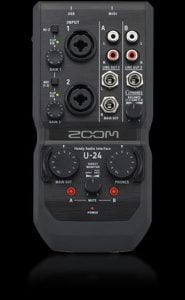
Zoom U-24Zoom is an audio-equipment manufacturer best known for its portable recorders. Its H2, H4n, H5, and H6 Handy Recorders are widely cited as some of the best devices for remote gathering of audio. While Zoom’s recorders are designed to be all-in-one products, with microphones and recording capabilities built-in, Zoom’s newest product, the U-24 is a portable, high-quality audio interface.

Zoom is billing the U-24 as the “go-everywhere interface:”

The bus-powered U-24 packs all the essential tools into a compact form factor that fits in the palm of your hand. Record with mics, instruments, and more at home or on the go—the U-24 is iPad compatible and small enough to take anywhere. It can even run on just two AA batteries for recording in the most remote locations.

Here are some technical details:

  • Two combo microphone/instrument jacks, featuring a Hi-Z switch and 48v phantom power
  • Two sets of stereo line-out RCA jacks for connecting to external recorders or other gear
  • One set of 1/4″ main line-out jacks for connecting to audio monitors
  • One 1/4″ headphone jack with independent volume and balance controls
  • Mute controls for each input channel
  • USB and MIDI I/O jacks
  • Bus powered, battery powered, or powered via optional A/C adapter
  • Connect to iPad with Apple iPad Camera Connection Kit or Lightning-to-USB Camera Adapter
  • Zero-latency direct monitoring

The Zoom U-24 is currently available for $150 at most musical instrument and audio equipment vendors. For more information on the device, click the link at the top of this post.


WinX Video Converter For Mac/Windows Is Free Until Next Week


WinX Video ConverterCreating video files can be a real hassle. Different devices, different operating systems, different web browsers and applications, all have their own requirements when it comes to presenting video. Ideally, video producers could just offer one “master” file for distribution, and all of those different outlets would adapt that master file to their needs. But it truly is less than an ideal world when it comes to video distribution. That’s why it’s important to be able to offer video productions in as many formats as possible. But it’s not always easy to know which formats to use or how to create them. That’s where the WinX Video Converter application from Digiarty comes in.

WinX Video Converter is available for both Windows and MacOS. Here are some of the program’s features:

  • Video converter that supports 1080p multi-track video MKV, M2TS, AVCHD, HDTV and BDAV
  • Convert video between AVI, MP4, H.264, WMV, MPEG, FLV, MOV, 3GP, QT, TS, MOD, TOD, and more
  • Support for merging, croping, trimming and adjusting parameters to control output size and quality
  • comes with diverse device presets for iPad Pro/mini 4/Air 2, iPhone SE/6S/6 (Plus)/5S, Apple TV (4), iTunes, Android, Samsung Galaxy Note 5/S6 edge+, HTC One M8, Google New Nexus 7, Chromecast, Amazon Kindle Fire, Surface Pro 3, WP8, Xbox, PSP, and more

Digiarty is offering a special free version of Video Converter thru Monday, July 11th. The Mac version can be downloaded here. The Windows version can be downloaded here.


Tascam’s iXR Is a Music Studio That Fits in a Bag


Tascam iXRIt’s become increasingly easier over time to capture and create audio in remote locations. No longer is it necessary to be tied to a room full of expensive gear in order to record vocals or produce instrumental tracks. Tascam’s latest digital audio interface, the iXR, was designed with this in mind. The iXR is extremely portable. Hence, it’s designation as “a music studio that fits in a bag”.

Tuscan’s iXR audio interface is a true solution for audio producers on the go. The iXR is MFI-compliant, so it can be connected directly to an IOS device via Lightning cable. No USB adapter required. Producers can use the iXR to quickly access a plethora of sound-related apps, such as multitrack recorders, effects processors, software synthesizers, and more. The iXR also has a standard USB 2.0 connection, so it can be used with desktop computers and other USB-ready devices.

The iXR comes with two built-in XLR/TRS jacks that allow for microphones or instruments to be connected directly to the device. There’s also onboard phantom power for use with condenser microphones. For monitoring, there’s a headphone jack as well as a pair of balanced line outputs that can be sent to powered monitors. The headphone volume jack works independently of the line outs, so these monitoring sources can operate at different volumes. There’s also a pair of standard MIDI I/O jacks for connecting keyboards and other MIDI-capable devices.

Pricing and release information are not yet available for the Tascam iXR.


Samson’s USB Microphones Now Available at Best Buy


Go Mic ConnectSamson Technologies is an industry pioneer in audio products. Their new family of USB microphones are now available at Best Buy stores nationwide. This includes the Go Mic Connect, Meteor Mic with Noise Cancellation Software, and Meteorite with Sound Deck Noise Cancellation Software.

Samson Sound Deck Noise Cancellation Software expands the capability of computer communication and recording. The software, powered by state-of-the-art digital noise reduction algorithms, produces crystal clear communications and recordings in even the noisiest office and mobile recording environments.

Go Mic Connect features:
* Portable USB microphone with Focused Pattern Technology
* Ideal for Skype, FaceTime, Google Hangouts, and VOIP communications
* Perfect for voiceovers, YouTube videos and recording music
* Samson Sound Deck software provides Focused Pattern Technology, Focus Direction, Digital Noise Reduction (DNR) Echo Erase and audio recorder
* Focused Pattern Technology adjusts pickup area (“beam”) towards desired sound source
* Focus Direction provides user control over pickup beam direction
* DNR Reduces ambient background noise (HVAC systems, computer fans, etc)
* Echo Erase eliminates echo/feedback caused by external speaker monitoring
* Clips atop laptops, computer monitors, and televisions
* Stands on desk for use with tablets and smartphones
* Headphone output for direct monitoring
* 1-touch Mute
* Mac and Windows compatible, no driver installation required
* USB cable and protective pouch included
* Available for $79.99 in Best Buy stores and at BestBuy.com

Meteor Mic with Noise Cancellation Software

Meteor Mic with Noise Cancellation Software Features:
* Large, 25mm diaphragm USB studio condenser microphone
* Plugs directly into any computer with a USB input, no drivers required
* Compatible with most computer-based digital audio workstation software
* Works with iPad using Apple’s Lightning USB Camera Adapter or Camera Connection Kit (30-pin)
* Cardioid pickup pattern
* 16-bit, 44.1/48Hz resolution
* Smooth, flat frequency response of 20 Hz – 20kHz
* Stereo 1/8” headphone jack for no latency monitoring
* Headphone volume control with microphone mute switch
* Fold-back leg design provides optimal mic positioning
* Durable chrome-plated body
* Includes USB cable and carry pouch
* Samson Sound Deck Noice Cancellation Software (Mac OS X/ Windows)
* Available in Chrome and Titanium Black for $69.99 in Best Buy stores and at BestBuy.com

Meteorite with Sound Deck Noise Cancellation Software

Meteorite with Sound Deck Noise Cancellation Software Features:
* 14mm diaphragm USB condenser microphone
* Perfect for high-quality recording in desktop and home studio environments
* Ultra-clear voice capture for Skype, FaceTime and voice recognition software applications
* Plugs directly into any computer with USB input, no driver installation required
* Compatible with most computer-based digital audio software
* Cardioid pickup pattern
* 16-bit, 44.1/48.kHz resolution
* Smooth, flat frequency response of 20 Hz-20kHz
* Integrated USB cable
* iPad and USB bus powered
* Chrome-plated body
* Removable magnetic base for optimal desktop positioning
* Samson Sound Deck Noise Cancellation Software (Mac OS X/Windows)
* Available in Chrome and White for $39.99 at BestBuy.com only


iSolo Wireless Acoustic Microphone


iSoloThe iSolo wireless acoustic guitar microphone was fully funded on Indiedgogo and is now shipping to all backers. The iSolo is also available through Amazon. It provides an easy way for guitarists to pick up great sound during recording or a live show.

The iSolo has a tiny microphone is integrated with complex radio equipment and wireless systems. It is designed to reduce wear and tear and to enhance sound quality. Press a button, and the iSolo can pair with a corresponding receiver for live audio reception or recording.

The iSolo has a special positioning design “magic carpet” that stays fixed and consistent. It stays put and leaves no residue behind. You can adjust and extend the microphone audio reception position however you want to.

The iSolo comes with the iSolo transmitter, a live receiver, a recording receiver, an AC adaptor, a traveling case, a charging line and a QuickStart Guide. It is available on Amazon.com. There is also an iSolo for the violin, and the company plans to make one for the flute, the ukulele and the erhu.


IK Multimedia Launches iKlip A/V


IK Multimedia iKlip GripIK Multimedia has launched the first smartphone broadcast mount for pro-quality audio/video. It is called the iKlip A/V. With iKlip A/V, you can take your best shot, capture your best take and get professional broadcast-ready results with just your smartphone and your favorite microphone. The iKlip A/V is now shipping.

The iKlip A/V gives broadcasters, videographers, and digital storytellers the ability to capture and monitor professional-quality audio for their videos on the go using its integrated high-quality XLR mic preamp with phantom power and built-in wireless receiver support. It also helps deliver a steady picture thanks to its secure smartphone holder and ergonomic handgrip.

It features an integrated microphone preamp with phantom power that lets you use a high-quality external microphone for audio capture. Simply plug your microphone or wireless receiver into the preamp’s XLR input, then plug the 1/8” TRRS cable into your smartphone’s headphone/mic jack. The iKlip A/V provides 48v of power via two AA batteries and also features built-in support for holding the most popular wireless microphone receivers.

The iKlip A/V features a large ergonomic handheld grip and expandable smartphone holding bracket that shares the same technology as IK’s Xpand Mini and the iKlip Grip for ultra-steady shooting. It can securely hold any iPhone, iPod touch, or Android devices with a screen size from 3.5” to 6”. The iKlip A/V can also be attached to a monopod or tripod thanks to the standard female threads on the underside.

The iKlip A/V is available now from photo/video, music, and electronic retailers worldwide, and from the IK online store, for only $/€ 179.99 (excluding taxes). It is now shipping.


Telestream Wirecast Version 7 Offers Affordable Live Streaming


telestream-logoTelestream has announced Version 7 of Wirecast, the leading live streaming and production software. Wirecast 7, which will be available later this month, adds new powerful production capabilities, GPU-accelerated encoding, and a streamlined user interface that allows users to effortlessly create and stream high-quality live broadcasts from their computers to dozens of popular destinations such as Facebook Live and YouTube.

Wirecast 7 allows event producers to create the highest quality live-streamed productions, with multi-camera switching, graphics, titles, and live encoding. With the new ISO recording feature, Wirecast Pro can save all original “clean” source camera media allowing an editor to easily repurpose content, free of any overlay graphics from the original broadcast.

The new User Interface in Wirecast 7 enables quicker and more flexible access to shot editing features and enhances on-the-fly editing. With the Shot Editor panel, users have more control over every aspect of a broadcast, including the time-saving in-shot source toggles that enable users to turn video and audio layers on and off within each shot for dynamic editing of complex composite shots.

Wirecast 7.0 adds more options for how text can be displayed on screen. Text can be entered live, via a file or from an RSS feed enabling a different user to prepare text that will be automatically picked up in the broadcast. A new audio mixer controls every source from one location, and an enhanced “mix minus” feature selectively mutes any source, such as the user’s own voice, while otherwise monitoring full stream audio output. A Global Hotkey Management system speeds up any repetitive task by allowing users to create their own hotkeys.

New Features in Wirecast Version 7:
* GPU-Accelerated encoding – for hardware encoding performance and less CPU usage

* Improved CPU utilization – for smoother, faster, streams

* Graphical Output Statistics – to see the health of the system (CPU/Memory usage) and the output stream (framerate, bitrate, and more).

Wirecast 7 will be available at the end of June on the Telestream store and through Telestream’s network of resellers. It will be unveiled to the public for the first time at InfoComm 16 at Magewell Booth N1850 and at the PTZ Optics Booth N2133.