NewTek Brings NDI Technology to Adobe Creative Cloud


NewTek LogoLast fall, NewTek, the Texas-based hardware/software developer renowned for its media and broadcast products, announced the launch of its new NDI protocol for transmitting video over digital networks. Since then, NewTek has been working with third parties to help expand the adoption of NDI. Last month, NewTek announced it would bring NDI to Adobe’s Creative Cloud family of applications and services:

The NDI integration enables users of Adobe Premiere Pro CC, Adobe After Effects CC and other Adobe Creative Cloud applications to send real-time video and audio to any NDI-enabled receiving product, such as production switchers or capture cards, across a standard Ethernet network. With NDI for Adobe Creative Cloud, creators and producers can significantly accelerate their pre- and post- production pipelines, bypassing rendering and uploading of creative elements for a faster, more efficient delivery for content review and approval. It also allows teams in different locations to work together in one interface in real-time, making creative decisions collaboratively—and saving valuable time in the process.

NewTek’s NDI plugin for Adobe Creative Cloud is available thru a $9.99 monthly subscription from the NewTek Store. The NDI protocol itself is now available as a royalty-free software developer kit for any company looking to establish IP workflows within their organization, or in production tools and systems they manufacture.



Interactivity Will Be Focal Point of ATSC 3.0


ATSC LogoATSC 3.0, the new standard that will soon be launched by the Advanced Television Systems Committee, will be more than just a protocol for the transmission of audio and video to viewers. ATSC 3.0 will also have an interactive side that could foster a new wave of app development for both terrestrial and online broadcasters. ATSC 3.0 will allow viewers to have experiences with their TV sets that are close to what they’re already getting with smartphones and tablets.

This interactivity comes courtesy of ATSC 3.0’s compliance with W3C standards for internet communication. Developers will be able to create apps that can now run in a web browser. This offers a wide range of potential opportunities for broadcasters and content producers. For example, if viewers are watching a news broadcast, developers using these new standards could create apps that aggregate related news items alongside the broadcast. Programs that include viewer polls or voting systems could benefit by building those interactive features right into their apps, instead of asking viewers to call an automated phone system or visit a website. ATSC 3.0 will also make it easy for viewers to opt into targeted commercial and marketing offers.

The rollout of ATSC 3.0 and its interactive components will take place later this year. The upcoming 2016 ATSC Annual Broadcast Conference is being billed as the “Countdown To Launch” of ATSC 3.0. The conference will host a series of events relevant to the release of this new broadcast standard.


The Leica M-D is Simplicity Personified


Leica M-DLeica has revealed the Leica M-D. It is described as a camera that offers no more and no less than the most important features. It also represents a state-of-the-art digital rangefinder.

The Leica M-D (Typ 262) is the first serial production model of the digital M family to be made without a monitor screen. The usual location of the screen on the back of the camera is now taken by the ISO sensitivity setting dial – one of the few, but essential, features of the camera.

Although the Leica M-D embodies the entire range of technical advantages perfected over decades in the Leica rangefinder system, it intentionally omits all but the most essential technical features. It has been radically reduced to the most important parameters required for photography – shutter speed, aperture, distance, and ISO sensitivity. This purist style helps the user focus his or her concentration on what is most essential: the picture.

The Leica M-D expresses purely functional, formal clarity and features design characteristics such as a top plate in brass with a step at the end citing the design of the Leica M9. The Leica red dot logo has been omitted from the front of the camera in favor of its unobtrusive appearance.

In addition to it’s purist looks, the hardly audible shutter of the Leica M-D guarantees maximum inconspicuousness when shooting. As an aid to this, the camera features a shutter cocking system that is particularly quiet in single exposure and enables a shutter release frequency of up to two frames per second. In continuous mode, the M-D has the same sequential shooting speed as its sister model and shoots up to three frames per second.

The Leica M-D is now on sale. The camera package also includes a real-leather carrying strap in full-grain cowhide.


Mevo Is the 4K Live Event Camera


Mevo cameraSometimes the best practice for capturing a live event is to have multiple cameras. But setting up these kinds of shoots can require lots of extra (not to mention costly) equipment. It can also be technically challenging to set up a multi-cam rig, as different manufacturers and models may have their own requirements for audio-video connections that may or not match each other. Could it be possible to deliver a robust multi-angle video presentation that uses only one camera? The new Mevo camera proves that this is indeed possible.

Mevo is a 4K camera that is controlled with an attendant iOS app. The app allows users to select specific sections of a live video and then “cut” to those sections as closeups, creating a multi-cam experience for the viewer. Filming a concert and you’d like to cut between a wide shot of the stage along with closeups of invidicual players? No problem. Just tap on one of the performers in the Mevo iOS app and the camera does the rest for you, switching seamlessly from the wide shot to the closeup.

Mevo makes it easy to cover remote events. The camera can stream over Wi-Fi or LTE internet connections. Mevo can also be connected via USB to a host device such as a laptop computer for further processing. Mevo is compatible with Livestream and Facebook Live right out of the box. Mevo is available for preorder at a special price of $299. That includes a $100 discount that expires once the preorder period ends.


EVE Audio is Giving Away a Desktop Monitor System


EVE Audio giveawayEVE Audio is a company from Berlin, Germany, that makes professional studio monitor speakers. It was founded in 2011 by Roland Stenz, who is described on the Eve Audio Facebook page as “a long-time aficionado for quality audio with a long background history in the audio industry.”

EVE Audio is turning five years old in May of 2016. To celebrate, they are doing a giveaway Someone will win a new EVE SC302/TS107 Desktop Monitor System. You can enter the giveaway on the EVE Audio giveaway website. You can register through Facebook or email.

The EVE SC203 has a small footprint and a big sound. It is the perfect solution for professional desktops with a limited amount of physical space. Each speaker is provided with the FlexiPad, a v-notch shaped orange rubberized pad that allows you to decouple the speaker from its base and angle it precisely at 0°, at 7,5° or 15°.

Features of the EVE SC203 include:

* New µA.M.T. Ribbon tweeter & 3” woofer

* Dedicated 30W PWM amplifier per driver

* 24bit/192kHz converter and DSP control

* Switchable satellite filter for subwoofer

* RCA analog, Optical and US digital inputs

* Rear passive radiator for extended lows

The EVE TS107 is also called a Thunderstorm (TS). It is a 7” subwoofer. All of their subwoofers feature the powerful accurate and low distortion sound reproduction that is the hallmark of all EVE Audio studio products.

Features of the EVE TS107 include:

* Down-facing suspended passive radiator

* Frequency response from 36Hz to 300 Hz

* Variable filter frequencies

* Switchable satellite filter & phrase control

* Built in limiter

* RCA (unbalanced) & XLR (balanced) inputs

* Remote control for system & sub volume

The official rules of the giveaway state that it is open to residents of the United States. Everyone who enters receives one entry. You can refer your friends and share on social media to earn bonus entries. Odds of winning depend on the number of eligible entries received.


Slick Stabilizer Is A Motorized Camera Steadycam


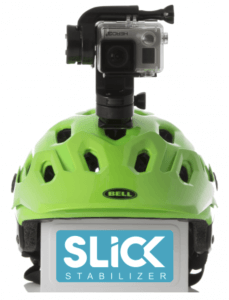
Slick StabilizerNobody likes watching video that’s bouncing and jerking around the frame. Some cameras come with built-in stabilizers to try and solve the problem. But those kinds of stabilizers can only do so much. There are high-end solutions like the Steadicam harness. But they’re very expensive and require special training to operate. Wouldn’t it be great if there were a middle ground between these two solutions? That’s where the new Slick Stabilizer comes in.

Slick Stabilizer is compatible with GoPro cameras. Using standard GoPro mounts, users can attach Slick to any of their favorite accessories – like a helmet, a pole, a dog, a chest mount, a drone, or even a surfboard. Slick is also the world’s first waterproof stabilizer. Slick can be used with water sports like surfing, sailing, kayaking, and kitesurfing. Here’s how Slick works:

SLICK uses motors and sensors: each of the camera’s motorized three axes is driven by a micro-controller, so that the camera stays perfectly level regardless of the kind of terrain you’re moving on.

SLICK is compact and very simple to use:

1) Attach your GoPro camera to SLICK

2) Attach SLICK into your favorite GoPro mount — they are all compatible

3) Switch it on and kick off the action!

Slick was launched thru a successful Indiegogo campaign. The product is currently in development and Slick’s designers are hoping to unveil a prototype soon. It’s still possible to preorder a Slick thru the Indiegogo page at an early bird price of $229.00.


Line 6 Releases Mobile POD 2.0 for iOS


Line 6 LogoMusic and audio equipment manufacturer Line 6 revolutionized the guitar effects industry with the release of its POD effects processor nearly two decades ago. The company hasn’t stopped innovating since. When it was clear that iOS, the operating system that runs Apple’s mobile devices, could be used for more than just placing phone calls and sending text messages, Line 6 began developing a special POD-inspired app for iOS. Hence, the Mobile POD app was born. Mobile POD was recently updated to version 2.0.
The app comes packed with 65 classic amps and effects for dialing in the perfect guitar tone, Users can save preferred custom tones or choose from presets designed by Line 6 engineers. Updated UI combines ease of use with fast interaction, and features a dynamic layout that adapts to any iOS screen. Updated ergonomics offer immediate on-screen access to all parameter settings while simultaneously allowing for precise editing with a single finger.

With Mobile POD 2.0 and an iOS device and it becomes possible to practice, jam, or record anywhere. Need to lay down some guitar tracks at 2AM without waking the neighbors? Maybe head out into the wilderness (or just the backyard) to do some inspired composing? It’s all possible with this app from Line 6.

Mobile POD 2.0 is available as a free download from the App Store. To unlock all of the app’s features, a $19.99 in-app purchase is required.


Lauten Audio Introduces Series Black LA-320 Microphone


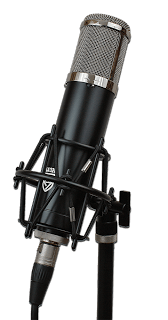
Lauten Audio Series Black LA-320Lauten Audio has introduced the Series Black LA-320. It is a large diaphragm vacuum tube condenser microphone that is professional and versatile. It is good for studio and vocal recording.

The Series Black LA-320 features a 1” gold sputtered diaphragm with cardioid polar pattern, dual-triode vacuum tube, 120 Hz low-cut filter, 12 kHz high-cut filter, and transformer balanced output. The low-cut filter helps reduce boomy lows or low-end rumble; the high-pass filter helps to tame the bright sources.

These features are designed to help people achieve excellent recordings regardless of their skill level. The Series Black LA-320 is the best entry into professional quality recordings with a tube microphone. It come fully equipped to get you recording with great results.

Each microphone includes a classic inspired spider shock mount to isolate the microphone from vibrations, a quality 5-pin microphone cable, custom, stable, dedicated power supply with a selectable mains voltage for use in all countries (100, 115v, 230v etc.), and a durable hard case to keep your microphone safe and clean when not in use.

Technical Specifications:

* Type: 1 inch dual large diaphragm pressure gradient transducer microphone

* Polar Patterns: Cardioid

* Circuit: Vacuum tube with transformer balanced output

* Frequency Range: 20Hz – 20KHz

* Dynamic Range: 120dB minimum

* Impedance: < 200 ohms

* Max. SPL: 0.5%THD@1000HzL 13odB

* Self-noise Level: <17dB-A

* Sensitivity: 14mV/Pa (@ 1kHz, 74 dB SPL)

* Special Features: Selectable, independent 120 Hz low-cut & 12 kHz high-cut filters

* Connector: 5-pin XLR (PSU to microphone) and 3-pin XLR (PSU to Preamp)

* Power Requirement: Custom power supply (Switchable 100v to 240v compatible range)

The Series Black LA-320 comes with a 1 year limited warranty from the date of sale from authorized dealer/distributor. Items limited to 90-days coverage include shock mounts, shock mount bands, cases, boxes, cables, microphone bags, and vacuum tubes. The Series Black LA-320 is $799.00 MSRP.


Blackmagic Design Announced New OS System for URSA Mini at NAB 2016


URSA Mini Heads Up Display Blackmagic DesignBlackmagic Design announced a major new camera operating system for its URSA mini cameras. This new camera OS features an incredible new user interface along with dozens of new features. Blackmagic Design demonstrated the new URSA Mini camera OS beta at NAB 2016.

The new URSA Mini camera OS is not just an upgrade, it’s a total rewrite from the ground up. The new OS has been specifically designed for the high performance processing architecture of URSA Mini and delivers a much more responsive experience, along with an entirely new user interface that makes using the URSA Mini faster and more intuitive than ever before.

The first things customers will notice is the incredible new user interface and heads up display which dramatically reduces the number of menus and submenus needed to find specific settings and commands. Customers can now quickly change settings such as ISO, white balance, shutter angle, iris, frame rate, frame guides and more without ever having to navigate through any menus.

In addition, there are now custom white balance and white balance presets, along with tint control settings. Customers also get more accurate shutter angle selection, including a large easy to use on screen keyboard for easy entry of settings. When entering the shutter angle, the new URSA Mini camera OS will even offer smart flicker free shutter angle suggestions to the camera operator.

Entering metadata on cameras has always been tedious. The new URSA Mini camera OS solves the problem of tedious metadata entry by giving customers an entirely new metadata entry page with predictive entry suggestions and a preloaded dictionary of commonly used terms that can be applied as metadata tags with a simple tap.

The new URSA Mini camera OS adds 1.33x and 2x anamorphic de-squeeze previews, along with the ability to double tap so customers can pan and zoom around the preview on the built in display. Customers can now import and store external 3D LUTs and apply the LUT to the LCD, and front and main SDI outputs independently. They can also load and save their own presets for different shooting setups or different operators.

In addition, customers can now assign shortcuts to camera function keys, toggle between peaking and color focus assist, see new percentage based safe area guides and have the ability to toggle SDI overlays with information specifically geared toward either the cinematographer or the director viewing at video village.

The Blackmagic URSA Mini camera OS will be available later this year as a free update for all Blackmagic URSA Mini customers. The URSA Mini camera OS beta was demonstrated at booth SL217 at NAB 2016.


Blackmagic Design Announces Desktop Video 10.6.4 Update at NAB 2016


Blackmagic Design LogoBlackmagic Design announced Desktop Video 10.6.4. Update which adds support for HDR playback over HDMI to UltraStudio 4K Extreme and DeckLink 4K Extreme 12G. Blackmagic Design demonstrated Desktop Video 10.6.4 at NAB 2016.

Desktop Video 10.6.4 Update adds playback support for HDR content over HDMI to UltraStudio 4K Extreme and DeckLink 4K Extreme 12G. The new HDR features include HDR metadata transport and support for the Rec. 2020 color space over HDMI. This means customers now get full support for monitoring on HDR capable displays using a single HDMI cable, making it ideal for editor and colorists working on HDR projects with DaVinci Resolve 12.5.

HDR, which stands for high dynamic range, is part of the new Ultra HD Premium standard so customers can now get big screen, low cost consumer televisions that support a massive range of color, peak brightness of up to 1,000 nits, which is 10 times brighter than most HDTVs, and incredible contrast ratio.

This means that colorists and editors working in DaVinci Resolve 12.5 with UltraStudio 4K Extreme or DeckLink 4K Extreme 12G will now be able to monitor images that are more true to life and more closely resemble the color and dynamic range of the latest cinema technology.

Features include:
* Adds support for Rec. 2020 color space output over HDMI
* Adds support for HDR metadata transport over HDMI

Desktop Video 10.6.4 Update is now available for free download from the Blackmagic Design website. Blackmagic Design demonstrated the Desktop Video 10.6.4 Update at booth SL217 at NAB 2016.