Category Archives: Information

Sony Announces New Flagship 4K and HD Action Cams


sony-boss-cameraSony Electronics, a worldwide leader in digital imaging, has announced their first POV cameras to feature the innovative Balanced Optical SteadyShot (B.O.SS) image stabilization technology, the FDR-X300R 4K model and HDR-AS300R Full HD model.

The flagship feature of the two new cameras – Balanced Optical SteadyShot – is an advanced form of image stabilization where internally, the camera’s lens and sensor are joined and moved together to compensate for camera shake caused by excessive motion, whether shooting handheld with optional accessories or during a fast-paced sporting activity. This is a particularly effective technology when paired with a POV action camera design as it ensures captured video footage is smooth and stable – even in 4K or high-frame-rate shooting modes.

The versatile FDR-X3000R and HDR-AS300R Action Cam feature a new ZEISS Tessar lens with significantly less lens distortion than previous models. They are also equipped with a new back-illuminated Exmor R CMOS sensor with large pixels designed for 16:9 aspect ratio video plus a powerful BIONZ X processor, ensuring that video quality remains consistently strong across all settings.

FDR-X3000R and HDR-AS300F each have a built-in stereo mic with wind noise reduction to reduce the impact of wind interference on overall audio quality, and are equipped with stereo microphone input for advanced recording.

The FDR-X3000R and HDR-AS300F both include a unique Time-lapse Capture feature that shoots still images in pre-set intervals that can later be transformed into a stunning 4K time-lapse movie utilizing the Action Cam Movie Creator software. The Action Cam App can also create time-lapse movies in Full HD.

The new Sony FDR-X3000R will be sold as body only for about $400 US ($550 CA), and will be offered as a kit (model FDR-X3000R) with the new Live-View Remote for about $550 US ($700 CA).

The new Sony HDR-AS300F will be sold as a body only for about $300 US ($400 CA) and will be offered as a kit (model HDR-AS300F) with the new Live-view Remote for about $450 US ($550 CA).

All products will be available in North America in late September at authorized dealers.


Livestream HD550, HD551 Now Available for Preorder in 4K


Livestream logoVideo streaming company Livestream recently upped its game in terms of its video-production offerings. Livestream’s portable Studio HD550 and Studio HD51 video production systems are now both available for preorder as 4K editions. Livestream made this announcement in conjunction with its showing at the recent IBC show in London:

Launching at IBC 2016, Livestream’s portable (Studio HD550) and rackmount (Studio HD51) live production switchers are now available in 4K edition for pre-order. Featuring 5 inputs and one output with full size HDMI and SDI connectors. The 4K Edition also features upgraded hardware all around: 64GB RAM, 8 Core Intel i7 CPU (16 Virtual threads), Windows 10, 2TB SSD drive. Pre-order now from Livestream or one of our resellers at store.livestream.com. Shipping in November 2016.

Livestream’s Studio HD series of products provide an all-in-one solution for live-video production. The HD51 is geared more for studio work while the Studio HD550 is a better fit for mobile producers at remote locations. Both models have plenty of inputs to make it easy to connect multiple video sources. Livestream’s Studio Software is included, making the Studio HD series a feature-rich video switcher capable of capturing and/or broadcasting live events. The Studio HD550 even comes with its own protective carrying bag, which makes it easy to transport to different locations.

The original Studio HD series and the new 4K editions can be found in the Livestream Store. Pricing varies, depending on which model you need.


AJA’s U-TAP USB Capture Devices Now Shipping


aja-u-tap-now-shippingAJA is now shipping U-TAP HDMI and U-TAP SDI for high quality HD/SDI. The U-TAP products offer a simple, cost effective and portable solution for plug and play capture that is compatible with OS X and Windows, and a broad range of software applications.

Small and simple to use, U-TAP connects directly to your computer system via a USB 3.0 connection which provides the simplest implementation ever, with no drivers to install and incredible software compatibility. U-TAP HDMI and U-TAP SDI offer easy, cost effective, and portable solutions for plug and play capture.

U-TAP SDI Features:

  • Compact and Portable
  • 3G-SDI, SMPTE-259/292/424 Looping Input
  • USB 3.0 connection to desktop or laptop
  • Bus Powered through USB 3.0 interface
  • Embedded Stereo Audio support
  • Supported by OS on Mac and Windows (with Linux coming soon)
  • 3 year warranty
  • US MRSP $345

U-TAP HDMI Features:

  • Compact and Portable
  • HD/SD HDMI v1.4a 24, 30, or 36-bits/pixel, RGB or YUV
  • USB 3.0 connection to desktop or laptop
  • Bus Powered through USB 3.0 interface
  • Embedded Stereo Audio support
  • Supported by OS on Mac and Windows (with Linux coming soon)
  • 3 year warranty
  • US MRSP $345

Convergent Design Announces Titan HD Extract


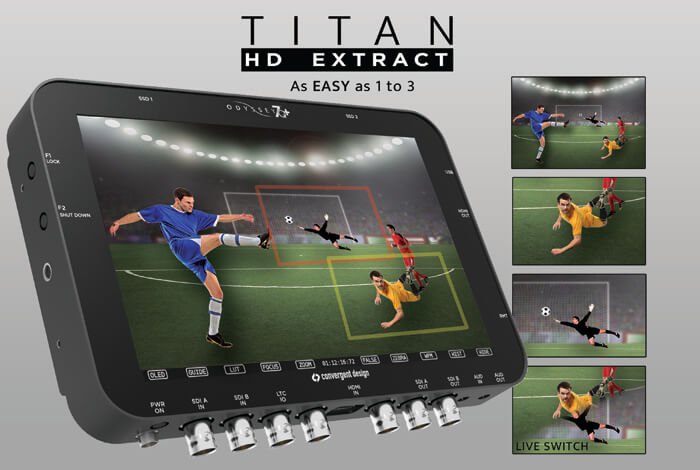
titan-hd-extractConvergent Design has released information about their Titan HD Extract. It is an incredible new upgrade option for the Odyssey and Apollo monitor/recorders. The Titan HD Extract allows multicamera production from a single 4K source.

Titan uses one 4K camera to create three HD video signals. One frame is a SuperSample of the full image area and two are windows selected from within the original input. These windows can be panned smoothly through the 4K field and the three angles can be Live-Switched. All four HD signals can be recorded simultaneously in Apple ProRes with matching timecode and file names.

Eliminate the render time of reframing in post. Deliver edited content as well as the complete separate angles to your client at the end of the shoot. Shoot a multi-cam job with a kit you can fit in a single backpack.

Titan accepts 4K video signals over HDMI and SDI (original Oddessy7Q limited to 3G-SDI). Titan also accepts 4K RAW data from the Sony F55, FS7, and FS700 cameras. Live-Switching is available as cuts and dissolves, and an Edit Decision List is generated as an .EDL file for conforming an edit in post.

Titan is an option for the Odyssey7Q and Apollo monitor/recorders. Other options (Odyssey RAW Bundle or Apollo) are not required for Titan,

Titan list price is $1295, but Convergent Design will offer Titan for a limited time at an introductory price of $995. Titan is expected to be available around the beginning of October.

https://youtu.be/hAIWclb14OM


Sienna Automation Production Control Compatible with NewTek IP Series


Sienna Automation Production ControlSienna, makers of broadcast automation for News and Sport announced compatibility between their Sienna MOS driven Automation Production Control system and NewTek’s IP Series vision mixer.

Sienna is used by many globally recognized broadcasters including the BBC, Associated Press, and Televisa. Support for NewTek’s ground breaking IP Series brings Sienna’s world-class capabilities to a new audience, at a dramatically reduced price point. Sienna’s extensive TriCaster integration brings full automatic production control within the reach of any news or sports broadcaster.

“IP Series is a revolutionary IP based vision mixer with great support for legacy SDI workflows”, said Mark Gilbert, CTO Gallery SIENNA. “We are proud to announce support in Sienna Automation for IP Series and we look forward to enabling fully automated IP driven workflows for news and sports stations embracing these important changes in the broadcast landscape.”

Automation Production Control
Sienna forms a sophisticated media asset management, edit integration and automation layer between TriCaster and MOS newsroom systems including ENPS, Inception, iNews, Octopus, and OpenMedia. With the NCS, producers can prepare a very complex news bulletin, including packages, vision mixer operations, virtual set camera moves, audio mixing, and on screen graphics.

This rundown is then driven step by step in the Sienna AutomationX live-asset system controlling TriCaster. Works with: TriCaster Mini, TriCaster 8000, TriCaster 860, TriCaster 460, and TriCaster 410.


NewTek Introduces the NewTek IP Series


NewTek IP SeriesNewTek has introduced the NewTek IP Series. It is a facility-grade, software-driven scalable system that combines IP flexibility with SDI compatibility. It asks the question: What if the boundaries about how to produce video did not exist?

Imagine the possibilities if your production wasn’t limited by hardware, and all of your sources and destinations could communicate. The NewTek IP Series merges the power, efficiency, and flexibility of IP with NewTek’s proven software-driven live production approach to define a new workflow paradigm: Interconnected Production.

Connecting, communicating, and sharing video and audio across the network using Innovative NDI technology, the NewTek IP Series acts as a single, interconnected production environment. Inputs, outputs, and media assets are readily available and accessible by any user in the location on the network, freeing your storytelling from the limits imposed by conventional production technology and enabling workflows of unprecedented scale and scope.

No Boundaries
* Transition gradually or migrate immediately to IP-based production workflows with incredibly practical infrastructure and bandwidth requirements.

* Remove the physical and logistical barriers limiting your potential to expand, grow, and evolve.

* Future-proof your video operations with progressive technology independent of formats and resolutions.

* Redefine your productions, workflows, and business now and for years to come.

Limitless Possibilities
* Align legacy and contemporary technologies across a simplified infrastructure to maximize resources and investments.

* Establish a production network in your control room or across your facility, connecting systems, users, and departments.

* Link multiple locations over IP to create sophisticated multi-system, multi-site workflows.

* Pool production inputs, outputs, and media assets for universal access and interchange.


Fujifilm’s New X-A3 is a Mirrorless Camera


Fujifilm X-A3Fujifilm has released its new X-A3 camera. It is a upgrade from last year’s X-A2 camera. Both versions are mirrorless cameras that have a fun retro style.

Fujifilm’s new X-A3 camera has a 180-degree tiltable LCD that is great for taking seflies. It lets you check your composition before you take the picture. Eye Detection AF and Portrait Enhancer mode automatically adjust for proper focus and skin tones.

The new 23MP APS-C sensor makes sure every image is high-quality. The X-A3 camera has built in Wi-Fi that lets you share to the Instax SHARE printer (which is also made by Fujifim). It also enables users to transfer the photos off of the camera and onto their smartphone or tablet. The touchscreen LCD monitor offers intuitive controls. Super Intelligent Flask and Macro mode are ideal for nightshooting or close-up photos.

The retro design makes the camera look fashionable. The top cover, front plate, and top dials of the camera are made of aluminum. Newly-developed faux leather gives the X-A3 a nice texture. The X-A3 comes in brown, silver, or pink.

Some specifications include:

* Number of effective pixels – 24.2 million pixels

* Image sensor – 23.6mm x 15.7 mm (APS-C) CMOS with primary filter

* Sensor cleaning system – Ultra Sonic Vibration

* Storage media – SD Card (2G) / SDHC Card (32G) / SDXC Card (256G) UHS-1

* File format for still images – JPEG (Exif Ver 2.3) / RAW (RAF format) / RAW+JPEG (Design rule for Camera File system compliant/DPOF-compatible)

* File format for videos – Movie File Format MOV, Movie Video Compression: H.264, Audio: Linear PCM Stereo

* Lens mount – FUJIFILM X mount

* It has face detection and eye detection.

* Shutter type – Focal Plane Shutter

* LCD monitor – 3.0-inch, aspect ratio 3:2, approx. 1,040K-dot Tilt-type, TFT color LCD monitor (approx. 100% coverage)


List of Multichannel USB 2.0 Audio Mixers/Interfaces


USB 2 logoFor years, Firewire was the reigning technology when it came to sending multichannel audio to/from an interface and a computer or other host device. While it’s still technically possible to use Firewire in many instances, the protocol is clearly giving way to other connection types like Thunderbolt and USB 2.0 (and probably down the line, USB 3.0). With that in mind, I was recently in search of a new USB 2.0 mixer. I wanted the ability to send multichannel audio to my computer for recording, and my current mixer, equipped with a USB 1.1 connection, could only send two audio channels. I began searching around for new gear options and was frustrated by just how difficult it was to find mixers and interfaces that met this requirement. After hours of searching and some suggestions I received on a couple of different podcasting-related forums, here’s the list of all USB 2.0 mixers and interfaces I could find that sell for less than $1000US.
  • Behringer X18 and XR18. Behringer’s fully digital “X” series of mixers are a bit confusing in that the X12 and X16 aren’t multichannel. But the X18 models are.
  • Soundcraft Signature 12 MTK. “The console is designed to deliver pristine recordings. Both have an ultra-low-latency USB interface that flawlessly captures every channel, which can then be mixed or transferred to a DAW for further mixdown and production.”
  • Behringer UFX1204. Another multichannel mixer from Behringer. Unlike the X series, this one is a traditional analog mixer with a USB interface.
  • Allen & Heath ZEDi 10FX. I’ll admit, I was surprised to find something by Allen & Heath in this price range.
  • Presonus StudioLive AR8. This little mixer has some intriguing features, including a built-in SD card slot for recording.
  • Focusrite Scarlett. These interfaces aren’t actually mixers but they are multichannel and Focusrite offers a full range of options, depending on how many inputs you need.

That’s all of the multichannel USB interfaces/mixers I could find for under a grand. Did I miss any? If so, leave the information in the comment section below.


Tascam’s MiNiSTUDIO Interfaces Are Made for Podcasters


MiNiSTUDIOPodcasting has been around for over a decade. During that time, podcasters have had to rely on a plethora of tools that were really designed for other uses. Sure, you can create a podcast with gear that was created for music or live sound production. But it can lead to complex workarounds or other hassles that keep you from the important thing: Creating your podcast. With that in mind, Tascam has released two new MiNiSTUDIO interfaces made with podcasters in mind.

First up is the Tascam US-32:

Central to the MiNiSTUDIO Personal is an XLR/combo mic/line connector and a professional quality micropone preamp. Built-in phantom power allows you to quickly and easily connect your favorite dynamic or conderser microphone…or not… For the ultimate in plug and play convenience, the MiNiSTUDIO Personal features a built-in microphone, so you’re ready to talk the talk right out of the box. Simply press the ON AIR button and go to town. And to top it all off, the MiNiSTUDIO Personal features a 4-band parametric EQ, adjustable on-board compression and a digital reverb effect with a convenient front panel depth control.

The US-32 also comes with built-in clip playback and sound effects. You can use the stock clips that come with the US-32 or you can customize them with your own sounds. Then there’s the built-in vocal effects:

Di(s)guise your voice, fool your fans! Perhaps the most extreme feature of the MiNiSTUDIO Personal is the Voice Effects option. Simply pressing this innocent little button will instantly transform your voice in any one of a number of amazing and amusing ways. Pitch your voice up into cartoon mouse territory or pitch it down like you’ve joined the Dark Side. Add a spacey Echo, wobbly Chopper or go old school with the Walki-talkie-approved Radio effect. Voice Effects: crazy, wacky and a whole lot of fun.

Next up is the US-42. This model has all of the features of the US-32 as well as an additional microphone input. It also comes with a Creator/Broadcast switch:

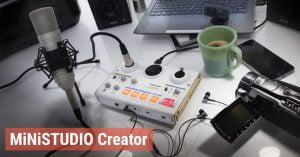
Unique to the MiNiSTUDIO Creator is a powerful Creator / Broadcast selector switch on the front panel of the device. When set to Broadcast mode, the audience will hear exactly what you hear as all audio generated my the MiNiSTUDIO and/or your computer will be mixed together in a single stereo stream. Talk, play guitar, play games or play MP3 files. If you hear it, they hear it. But flick the switch to Creator and you’re in full production mode. When set to Creator, the MiNiSTUDIO transforms into a professionally specced two-channel USB Audio Interface. Perfectly suited for any DAW or video editing software, the combination of dual HDDA mic preamps, Hi-z inputs, EQ, compression and reverb deliver a powerful and flexible front end for any media production task.

Both versions of the Tascam MiNiSTUDIO are available for purchase now. The US-32 is expected to retail for $129.00 and the US-32 should sell for $179.00.


Windows 10 Update Breaks Support for Many Webcams


Win10 logoMicrosoft has endured a lot of criticism lately over its aggressive policy of pushing software updates onto customers. This was probably demonstrated most noticeably over the company’s unwillingness to let users of Windows 7 and Windows 8 stay with their current operating systems, and constantly badgering (and in some cases, forcing) them to upgrade to Windows 10. Now it looks like the Redmond, WA-based tech monolith is about to receive a new round of hate, as its recently released Windows 10 Anniversary Update is causing many webcams to stop working:

Microsoft made a significant change with the release of Windows 10 and support for webcams that is causing serious problems for not only consumers but also the enterprise. The problem is that after installing the update, Windows no longer allows USB webcams to use MJPEG or H264 encoded streams and is only allowing YUY2 encoding.

And:

Because of this change, which Microsoft tried to defend but then realized the scale of the impact this change has caused, means that when a webcam tries to use MJPEG or H264, the device will freeze. If you use Skype and your webcam freezes after about a minute, this is the reason.

Microsoft is hoping to deploy a fix for this problem next month. If you’re experiencing webcam issues after the Anniversary Update and you can’t wait until then, check the bottom of the article linked in the above paragraph. One resourceful user has found a registry hack that should make your webcam usable again.