Category Archives: Information

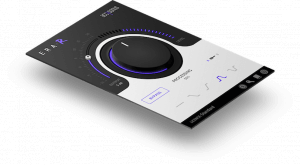
Accusonus ERA-R is the World’s First Single-Knob Dereverberation Plugin


ERA-R PluginIn a perfect world, all audio recordings would be made in a controlled studio environment with proper acoustic treatments and sound proofing. That way, the captured audio would be as clean and dry as possible. But, with the proliferation of low-cast audio recording systems, a modern-day recording “studio” could be anything from a cavernous cathedral to a small bathroom. That means that sometimes, the resulting recordings might have some unwanted echo/reverb effects that couldn’t be eliminated at the source. While it’s simple enough to add echo/reverb to a recording afterwards, it’s not always easy to take it away.

Accusonus has worked to solve the problem of unwanted echo/reverb with its new ERA-R dereverberation plugin:

Add clarity to your mixes, clean up your dialogue tracks and tighten up your music performances. ERA-R is the only plugin that attenuates or removes excessive reverberation with a single knob. Based on the accusonus multi-patented audio restoration technology, ERA-R automatically estimates the reverberation profile and offers the means to adjust the reverberation amount in a streamlined interface.

The ERA-R plugin is compatible with most modern versions of macOS and Windows. Accusonus has tested the plugin with Ableton Live 9.7, Apple Logic Pro X 10.2, Steinberg Cubase 7.5 (64-bit only), Avid Pro Tools 11.3 and 12.5, Cockos Reaper 5.32, Presonus Studio One 3.0, ImageLine FL Studio 12.0, and Audacity 2.1.2. ERA-R is currently available at an intro price of $39. ERA-R is also available as part of a few bundle offers from Accusonus that vary in price.
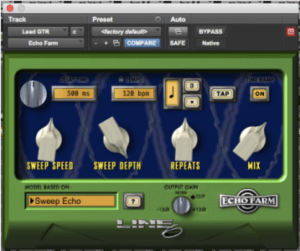

Line 6 Echo Farm 3.0 Plugin Now Available for ProTools


Echo FarmAudio production professionals can never have enough reverb/echo plugins. These effects can often help turn a good mix into a great one. There are plenty of good free plugins out there for reverb and echo. In fact, most digital audio workstations come preinstalled with decent ‘verb and echo sets of their own. But sometimes, a mix needs more than what the base line can offer. That’s where plugins like Echo Farm from Line 6 come in.
Recently, Line 6 released the latest version of Echo Farm (3.0) for ProTools:

Classic Delay and Echo Effects for Pro Tools Systems Bring the same legendary collection of vintage echo effects back to your studio with Echo FarmTM 3.0—now available as a 64-bit AAX plug-in for Pro Tools 11 and higher. Choose from 12 models based on* vintage hardware units like Maestro® Echoplexes, Roland® RE-101 Space Echo®, Boss® DM-2, Electro-Harmonix® Memory Man and T.C. Electronic® 2290—plus Line 6 originals. Each unit delivers the detailed sonic properties of tubes, tape and vintage electronics—so you can add organic warmth and mojo to your mix without the expense and hassle of bulky outboard gear.

Echo Farm 3.0 for ProTools is currently available for macOS only (Windows version coming soon). The plugin requires iLok authentication as well as a qualified Pro Tools HD or Pro Tools system, software version 11 and higher. Echo Farm 3.0 for ProTools costs $199 for first-time buyers. There’s also a $49 upgrade option available to owners of Echo Farm 2.x versions of the plugin.


Focusrite iTrack One Pre is an Audio Interface for iOS Devices


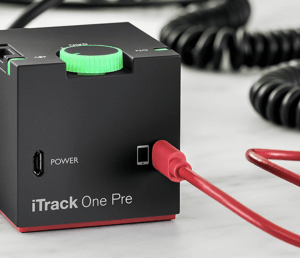
iTrack OneSmartphones and tablets are more than just communication and consumption devices. They’re high-powered computers capable of doing many of the same things as full-fledged desktop machines. For media producers, that means things like multitrack audio production. And while devices like iPhones and iPads come with built-in microphones that make it possible to record sound, this process can be greatly improved with the addition of a dedicated audio interface. That’s where the new iTrack One Pre from Focusrite comes in:

Capture high resolution audio from a mic or guitar directly onto your iPhone or iPad, wherever and whenever you want.

Never before have you been able to record a professional condenser microphone into your iPhone or iPad without needing any external power, making it even easier to record on the go.

The iTrack One Pre connects to an iOS device thru the Lightning port, where it sends audio into the host device for recording. Live audio monitoring is done thru the host device’s headphone jack. (Devices without a headphone jack, like the iPhone 7, don’t have the ability to do live-audio monitoring, but can still record with the iTrack One Pre.)

The iTrack One Pre is officially Apple MFi certified on all iOS devices up to the iPhone 6s Plus and iPad Pro to ensure compatibility with host devices and apps. The iTrack One Pre can also provide phantom power for condenser microphones that need it.

The iTrack One Pre is available for purchase for $129.99.


Livestream Releases New HTML5 Media Player


Livestream logoWider adoption of the HTML5 standard for media players is a good thing, if for no other reason than, it means Flash will be killed off faster. That’s why it’s good news when larger, established platforms begin to adopt HTML5. That’s what happened when Livestream recently announced the rollout of its new HTML5 player:

Livestream’s HTML5 player is now available to Chrome users on Livestream.com as well as in the live player embed and video-on-demand.

HTML5 has become the industry standard in video viewing. More web browsers are eliminating the need for plugins and add-ons as HTML5 players have greater flexibility than their Flash counterparts.

Now Livestream producers and viewers alike will enjoy more resilient playback on Livestream.com and Livestream’s player embeds as well. This new player is nimble and responsive, equipped for quicker load times and less processing power from your computer so it won’t slow you down.

Livestream hasn’t completely given up on Flash yet. The new HTML5 player is only available to Google Chrome users who are viewing video streams on the Livestream website or embedded Livestream media players. But, the company is planning to implement HTML5 on other browsers and platforms:

We’re eager to implement the HTML5 player across all browsers, including support for Safari, Firefox, and others. These changes are automatic, so users will not need to adjust their account settings, nor will they incur any additional cost.

This is great news for video producers and consumers. Hopefully, more platforms will follow Livestream’s lead and begin implementing HTML5 media players.


Lolly is a Full-Fidelity Audio Recording Microphone for iPhone


LollyThe iPhone has become a valuable tool for media producers. And while the device can do a lot on its own, it can be improved dramatically with external add-ons like microphones. Simply plugging a high-quality, dedicated microphone into an iPhone can raise the sound quality of audio and video recordings noticeably. But, it’s not always easy to find a microphone that’s compatible and/or easy to use with an iPhone. That’s where the new Lolly microphone comes in:

Lolly is the first portable 3D recording device that gives listeners an immersive feeling. Our three dimensional sound makes it seem like you’re hearing the music live!

Lolly is compact and portable so you can easily slip it in your pocket. It’s also very user-friendly. You don’t have to be an audio engineer to have professional quality!

Lolly records in 48kHz/44.1kH. The response frequency ranges from 20Hz to 20,000kHz. & sensitivity is -42dBFS/Pa at 1kHz

Lolly connects to an iPhone thru the phone’s Lightning port, so there’s no dongles or adapters to worry about if you’re using the microphone with a newer iPhone model. Lolly also works seamlessly with all iOS-based media production apps, including GarageBand, Instagram, Snapchat, Facebook, and Voice Memos.

Lolly is set to be released in the next few days. Follow the link at the top of this post to sign up for release announcements and more information on the Lolly microphone.


Livestream Studio 4.2 Available Now


Livestream logoLivestream Studio, the software heart of Livestream’s computer-based live media production system was recently upgraded to version 4.2. The latest version of Livestream Studio is designed to increase CPU performance, as well as provide simulcast support, and more.

Here are some of Livestream Studio 4.2’s key features:

Multi-Destination Streaming: Stream simultaneously to multiple livestreaming platforms from Studio. This requires more bandwidth from the network you’re using to stream, but will not use more CPU. For a more optimized setup, you can also leverage the new simulcasting feature of the Livestream Cloud Platform (Premium and Enterprise plan), which sends a single stream to multiple platforms without clogging your venue internet connection.

Hardware Acceleration: Lower your CPU when streaming with PCs running on NVENC-enabled NVIDIA GPU or Intel CPU with QuickSync support. This includes custom Studio configurations, the Livestream Studio HD550 4K Edition, and Studio HD31. Streaming at 4K and 1080p60 is also available on these hardware platforms with our new hardware acceleration support.

Graphics Support in Web Control: Web Control gives producers remote control of your Livestream Studio software using a WebRTC compatible browser (Safari, Chrome, Firefox). Web Control now gives you the ability to fully control your Graphics module, including adding and editing data. Delegate graphics tasks to other team members while you focus on cutting the show on the main Studio interface.

Livestream Studio 4.2 is available as a free upgrade to existing Livestream Studio customers.


SoundSource 3 is an Audio Routing Tool for Mac


SoundSource logomacOS has proven to be an essential tool for media producers. The operating system’s overall stability, combined with its implementation of Core Audio have given media-focused developers a solid foundation for building robust, full-featured media-production applications. But macOS still has some limitations when it comes to the internal routing of audio. Some things can be configured thru the Sound pane in System Preferences. But sometimes, that’s not enough. That’s where SoundSource, an audio routing application from Rogue Amoeba comes in.
Rouge Amoeba recently announced the release of SoundSource 3, the latest version of the app:

From SoundSource’s menu bar icon, you can instantly configure the audio devices your Mac uses for Input, Output and Sound Effects. In seconds, you can adjust the volume for each of your audio devices or switch between connected devices. SoundSource can also enable the soft play-thru of audio from input devices. Use the Play-Thru window to monitor any connected input, such as a microphone, right through your headphones or other output.

SoundSource is a superior sound control in a tremendously convenient package. It tucks out of your way in the menu bar until you need it, then provides easy access to swap audio devices, adjust volumes, and more.

SoundSource is available as a $10 download direct from Rogue Amoeba. The company is also providing a special offer for existing customers of any Rogue Amoeba product that allows those users to get SoundSource for free.


Sienna Releases WebCam for NDI


Sienna NDIWe’ve written about Network Device Interface (NDI) before, the protocol developed by Newtek that makes it possible to send HD video over networked connections. Newtek has encouraged widespread adoption of NDI by releasing the protocol under free, open-source terms. This has allowed the video production community to find different uses for NDI, and Sienna has the latest development in NDI-compatible software.

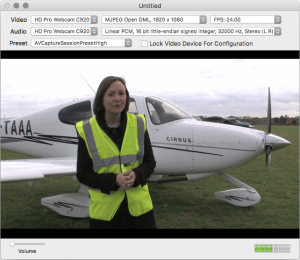
Sienna recently released WebCam for NDI, an application that allows users to work with macOS-based webcams over NDI connections:

This unique app turns your macOS Webcam into a powerful network camera, using the NDI IP Video Protocol.

Simply launch the app,select your camera and a new NDI service will be registered on your network.

Now you can select WebCam for NDI from any NDI compatible receiver, such as NewTek TriCaster Advanced edition and use the mac’s Camera as a high quality network video and audio source.

WebCam for NDI is low latency and high quality and adds a convenient way to connect things like MacBook iSight Cameras into your production mix .

WebCam for NDI requires a solid network connection, as NDI can use a lot of bandwidth. WebCam for NDI is compatible with many popular webcams, including the Logitech C920 and Apple iSight cameras. WebCam for NDI also supports AVFoundation compatible devices.

WebCam for NDI is available as a $39.99 purchase from the Mac App Store.


Bayco Products Introduces New Nightstick Portable Lights


Bayco Products Inc., a Texas based leader in professional grade lightning products, announced availability of their new 1,000 Lumen Nightstick NSR-1514 LED Rechargeable Area/Scene Light with Magnetic Base, and 1,000 Lumen Nightstick NSR-1514C Rechargeable LED Area Light Kit which includes a 6 foot tripod placed inside a durable carrying case.

With an impressive 1,000 lumens of light on high, 500 lumens on low using a single sealed push button switch, the discrete yet powerful Nightstick NSR-1514 weighs only a mere 3.3 pounds.

Leveraging lithium-ion rechargeable battery technology to provide up to 8 hours of continuous usable light on 1 single charge, the NSR-1514 also features a rare-earth 10 pound pull force magnet in the supporting base. With hands-free use and lightweight rechargeable portability in mind, this area light will swivel independently providing the ability to position light exactly where needed and at angles not available in traditional fixed position scene lighting until now.

The NSR-1514 Rechargeable LED Area Light with Magnetic Base is perfect when portability is important. The housing is constructed from lightweight 6061-T6 aluminum and the multi-fin heat sink design keeps the fixture cool to the touch. The area light includes an adjustable handle, AC and DC power supplies.

The NSR-1514C Rechargeable LED Area Light Kit is also perfect for portability. The housing is also constructed from lightweight 6160-T6 aluminum and the multi-fin heat sink design keeps the fixture cool to the touch. The area light kit includes an adjustable handle, a 6” tripod with camlock adjusters, and AC and DC power supplies all placed inside a durable carrying case.


Powersoft Audio Launched Quattrocanali Amplifier Series


Powersoft Audio has launched its new Quattrocanali series (which it brought to the ISE Show). This completes Powersoft Audio’s installation series that also includes the Duecanali (two channel) range.

The Quattrocanali offers the traditionally amazing sound quality and reliability of all Powersoft products. The patented SRM (Smart Rails Management) technology allows you to maximize the efficiency of the system.

With output powers ranging from 300W to 1200W per channel, in depth control and monitoring capabilities, Quattrocanali is designed to be conveniently tailored to all small to medium sized installation projects. Quattrocanali is a 4-channel class D amplifier platform. The series includes three models: the 1204, the 2404 and the 4804.

The Quattrocanali 1204 is a crisp sounding, high end 4-channel amplifier platform. The Quattrocanali 2404 allows for cost effective performances for small to medium range installations. The Quattrocanali 4804 offers sustained power for small to medium sized applications.