Category Archives: Information

Edit and Share HD Footage with GNARBOX


GNARBOX logoGNARBOX is the world’s first mobile solution for viewing, backing-up, editing, and sharing your HD footage from any GoPro HERO or DSLR camera. It reduces the amount of equipment that you need to carry with you. All you need is your camera, your phone, and the GNARBOX.

GNARBOX is currently on Kickstarter. At the time I am writing this blog, it has 24 days to go, and it has already been fully funded.

Backup your camera right from the field. Upload up to 128 GB of full resolution footage from any camera to the GNARBOX. It is pocket sized and weatherproofed.

Next, connect your phone to the GNARBOX Hotspot and open the GNARBOX app. This lets you instantly view HD photos and videos, and securely backup your HD photos and videos at up to 4GB per minute. It also will auto-organize your content by date, time, and GPS. Use GNARBOX to quickly create highlight reels or touch up your photos.

When you are done, you can share your edits at full resolution. GNARBOX can deliver your footage to the world (up to 4K video and RAW photos). The GNARBOX can share your photos with your phone and three other devices. You can also post photos and videos on Instagram, Facebook, Twitter, YouTube, Vimeo, or put them into your Dropbox. You can make a highlight reel of your day and share it with friends and family.

IK Multimedia Announces Firmware Update


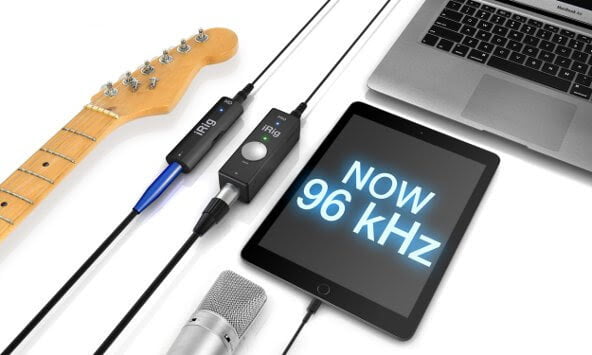
IK Multimedia firmware updateIK Multimedia has announced a 96kHZ firmware update for iRig PRO and iRig HD. Users can now get ultra-high quality 24bit/96kHz recording studio sound anytime and everywhere. The update is complementary.

The new firmware update enables high resolution 24-bit/96kHz audio sampling for its iRig PRO and iRig HD mobile audio interfaces. At double the original 24-bit/48kHz sample rate, it makes these ultra-compact mobile interfaces sound even more clean, nuanced, and transparent by offering the utmost in professional recording quality.

Use it anywhere and anytime. Its an ideal feature for professionals and advanced home studio enthusiasts who won’t settle for anything less than the best sound possible. The firmware update is offered at no-cost for all existing iRig HD and iRig PRO users.

To update, existing users just need to log into their user account on the IK Multimedia web site, download the firmware updater for their computer OS and then follow the simple installation instructions. Both the PC and Mac version of the Firmware Updater are available now.

IK Multimedia is also offering a $20 discount on the list price for iRig PRO and iRig HD through the entire month of July of 2015. The iRig PRO is now available for $129.99 and iRig HD is available for $79.99. Both can be purchased from music and electronic retailers worldwide and from the IK Multimedia online store.


GoPro HERO4 Session is Light and Durable


GoPro logoGoPro’s new HERO4 Session is the smallest, lightest, most convenient camera yet. The catchphrase for this camera is “So small. So stoked.” It is designed for athletes who want a simple way to film themselves in action. HERO4 Session will be available for purchase on June 12, 2015.

HERO4 Session features a rugged and waterproof design and an easy one-button control. It is a small, cube shaped GoPro that is easy to wear and mount. It weights just 2.6 ounces (74g). An athlete can attach it to a helmet, a bike, a kayak, or whatever else they can think of. The HERO4 Session will also be useful for filming family vacations.

Use HERO4 Session to capture video in a variety of resolutions. The video format is h.254 codec and .mp4 file format.

The camera can record a continuous video loop that overwrites itself until you press the shutter button to stop it and save. It has a SuperView feature that can capture a tall perspective (4:3), which allows you to capture more of yourself and your surroundings in the shot. That content is then dynamically stretched to a wide perspective (16:9) for full, immersive, widescreen playback.

You can use the camera to take burst photos. It can capture up to 10 photos in 1 second. Or, take a time lapse photo at 0.5, 1, 2, 5, 10, 30, and 60 seconds.

It comes with specially designed mounts and accessories that give you more mounting options. There is a Low-Profile Frame that sits low on a table or other surface. The Standard Frame can be used with GoPro mounts to create a wide array of ultra compact gear setups. The Ball Joint Buckle lets you move the camera around without having to stop and unmount the camera.

There are two different editions of this new GoPro: HERO4 Session, and HERO4 Session/Surf. The HERO4 Session comes with 1 curved mount and 1 flat adhesive mount, while the HERO4 Session/Surf comes with a surfboard mount, an FCS plug mount, and a camera tether.

Both the HERO4 Session and the HERO4 Session/Surf have a 1030mAh lithium-ion rechargeable battery. Each comes with a micro USB cable, a standard frame, and a low-profile frame.

The HERO4 Session, and the HERO4 Session/Surf are each priced at $399.99. They will be available for sale as of July 12, 2015.

https://youtu.be/pzMRr5eTtho


Solocam Combines a Selfie Stick with a Microphone


SolocamLooking for a really simple way to record audio and video content for your podcast anywhere you go? The Solocam might be your solution. It combines a selfie stick with a hand held microphone. At the time I am writing this blog, Solocam has 28 days left in their Indiegogo campaign.

Solocam feels like the natural extension of the selfie stick. Adding a microphone to the selfie stick results in a recording studio in the palm of your hand. Bring Solocam to an event, and you can film content for your podcast all by yourself!

The Solocam has a dynamic microphone, with a frequency response of 50hz to 15,000hz. The audio quality is 48khz / 24bit. It has a built-in spherical wind and pop filter. The selfie stick portion of Solocam has a holder that can safely hold smartphones, GoPros, and cameras. The microphone is designed to be comfortable to hold in your hand.

The Solocam App comes free with the Solocam. It includes a teleprompter, which podcasters can use to read from text while recording a video. (Or, you can use it to read song lyrics while you record a karaoke video). The app can enhance your voice and audio quality. You can also add special effects and video filters while you are recording.

The Solocam App lets you switch between the front and back camera on your smartphone. This could be useful if you are at an event and want to report on it and show what is going on at the same time. Solocam is working with its partners to enable live video broadcasting from within the Solocam app.


Instamic has a Kickstarter


Instamic and Instamic ProInstamic is a tiny, portable, microphone that you can stick onto things. It is described as “the smartest, smallest, and most affordable microphone and audio recorder that’s easy to operate.” It has a Kickstarter that has been 235% funded (at the time I am writing this blog). There are 22 days left in the Kickstarter.

The Instamic is being compared to the GoPro because both are extremely simple to use. The Kickstarter says “What the GoPro did for cameras, Instamic is doing for microphones”. You can charge the Instamic on any USB port via a USB 2.0 connector. It turns on with a single touch. There is a free app that you can download and sync with your Instamic via Blue tooth 4.0. Just like that, you are ready to record. Instamic is compatible with both iPhone and Android. It is possible to trigger recording to start via the smartphone app.

The Instamic is a good choice for situations when you cannot use booms, lav/lapel mics, or other gear. It’s small, and can blend right into whatever you decide to attach it to. The Kickstarter shows it on a person’s shirt, attached to an amp, and a person sticking the Instamic onto the back of his car. It also has a lanyard clip that enables a person to wear the Instamic on their neck or wrist. It allows for hands-free recording.

The Instamic Go is splash-proof (but it cannot be submerged in water). It has mono and dual mono recording modes. You can use it to record for 4 hours in mono or 2 hours in dual mono. The Instamic Pro is waterproof up to 5 feet underwater. It has mono, dual mono, and stereo recording modes. You can record with it for 4 hours in mono or 2 hours in either dual mono or stereo.

Both versions of the Instamic have a battery that lasts for 4 hours, or 3.5 hours with Bluetooth. The batter is an internal Li-ion rechargeable battery, which can be charged via USB Cable. It uses Bluetooth 4.0. Both versions of Instamic have 2GB internal memory.


Zylight Has New Lighting Products at NAB


Zylight LogoZylight has been providing industry-leading lighting products for television, film, and theatrical production since 2003. And the company is still going strong, arriving at this year’s NAB with some cool new lighting solutions in tow.

Jeff Hamel from Zylight visited with Don Baine to talk about some of these new products. Principal among them is the new Zylight Newz lighting system. Newz is designed specifically for electronic news gathering and it has been beta tested for for over six months by French TV producers. Newz is meant to replace Zylight’s workhorse Z90 light. Newz features a compact design but it’s still a very versatile and powerful piece of kit. It has two onboard dials that allow for full control of dimness and output color.


Teradek Has Many Video Encoding Solutions at NAB


Teradek logoIf you face any kind of challenge in terms of your video production rig/workflow, Teradek probably has a product or two that’ll help you out.

Topher Delancy from Teradek came by to chat with Don Baine and show off some cool devices. First up was the VidiU Mini which is a streaming video encoder that can work with a GoPro camera or any other HDMI video source. Next up was the VidiU Pro which is a versatile encoder that can bond multiple Internet connections (Ethernet, Wi-Fi, USB) into one big pipe to maximize remote connections. Last but not least, Topher talked about Teradek’s full-featured iPad video production suite that can be used to overlay text, graphics, chromakey, titles and more onto live video from multiple cameras, then send that video to any major CDN.


PESA Brings a New Video Streaming Service to NAB


PESA logoIt might seem like live video streaming is truly ubiquitous in 2015. But there are still many hurdles to overcome for video producers. Fortunately, companies like PESA are out there designing new products and services to help bridge the gap.

Don Baine got to speak with Christopher Thomas and Howard Sutton from PESA. Christopher talked about PESA’s new broadcast video routers that are designed to integrate flawlessly with a number of different video products, including those made by NewTek, Datavideo, and Livestream.

Then Howard took over to demonstrate PESA’s new cloud-based video control offering. This service will allow producers at remote location (such as sporting events) to send their video signals to the cloud where PESA can help with troubleshooting problems like video lag and sync, then push that video to CDN’s for live distribution.


The Sidefinder has a Built In Monitor


SmallHD logoDon Baine Introduced Wes Phillips, CEO of SmallHD. The company makes monitors that sit on top of cameras. They talked about the Sidefinder, which is described as the ultimate HD viewfinder.

The Sidefinder is the highest resolution third party viewfinder in the world. It has a resolution of over 720p. It’s 1366 x 768 through the viewfinder.

The cool thing about the Sidefinder is that it has a five inch monitor built in. The monitor can flip out so that you can see a full HD view of your screen. The monitor has a 1920 x 1080 resolution picture. The Sidefinder is a true hybrid device: it is a high end electronic viewfinder and a high end full size on camera monitor in one.

The Sidefinder has a crisp, clear, image. Its pixel density prevents pixelization when magnified by the optics. The pixel density on the display is higher than the iPhone 6. The Sidefinder can connect to anything that uses 3G, HD/SDi or lower. It can also do HDMI.


Next Computing Builds Custom Computers for Broadcasters at NAB


Next Computing LogoThere are a lot of options out there for producers when it comes to gear. That includes the computers they use. Sometimes, buying off-the-shelf machines does the job. But many times, it doesn’t. That’s where Next Computing comes in.

Aaron Sherman from Next Computing came by to talk with Don Baine about what Next Computing does. He explained that, even tho Next has designed and built computers for many companies you’ve probably heard of, you may not have been aware that Next was even involved. That’s because Next Computing specializes in building custom computers that meet the specialized needs of broadcasters and media producers.

The next time some cool new piece of broadcasting hardware hits the market, regardless of whose name is on the box, it may have actually be designed by Next Computing all along.