Tether Tools Has New Mounts and Stands for Monitors and iMacs


Tether Tools logoModern computer displays are amazing things. In most cases, they’re thin, light, and relatively portable right out of the box. That makes it easy to install them in all kinds of different locations. But most monitors only come with simple desk-based stands in the box. Thanks to the Video Electronics Standards Association (VESA) standards for monitors and TVs, it’s easier than ever to use most digital displays (and even Apple iMac computers) with all kinds of mounts and stands that make it possible to use those displays almost anywhere.

Tether Tools, a leading manufacturer of many popular adaptive stands for tablets, phones, and displays, recently announced a collection of new products to help creators use their monitors in new ways. Here’s a rundown of these new items from Tether Tools:

  • Rock Solid VESA Monitor Mounts: From Tether Tools: “These three VESA Monitor Mounts are an integral part of mounting a monitor to a stand or tripod. All three require a monitor that is VESA compliant with a 75×75 or 100x100mm configuration or a monitor that is outfitted with a VESA adapter.”
  • Rock Solid iMac Adapters: From Tether Tools: “The VESA iMac Stand Adapter employs a unique adapter ring system, and a heavy-duty steel construction will keep your iMac safe and secure. The brushed aluminum finish matches the look of an iMac, giving you a setup that is both attractive and functional. Pair a Rock Solid VESA Monitor Mount (sold separately) with a Rock Solid VESA iMac/Cinema Display Direct Adapter to mount your iMac to a stand or tripod.”
  • Rock Solid iMac Direct Adapter: For use with iMacs that have a VESA adapter already connected.
  • Rock Solid VESA Adapter Plates and Extensions: From Tether Tools: “Certain monitors have a VESA configuration larger than 100x100mm, that’s where our three adapter plates come in. These plates convert 200×200, 400x200mm, and larger VESA configurations to the standard VESA pattern of 100x100mm to make your monitor compatible with mounts such as the Rock Solid VESA Monitor Mounts (mentioned earlier).”
  • Rock Solid VESA Monitor Quick Release System: This system makes it easy to install or remove a display onto a stand or mount. Ideal for situations where you need to move a display between locations.
  • Rock Solid Non-VESA Monitor Mount Adapter Arms: From Tether Tools: “The Rock Solid Non-VESA Monitor Mount Adapter Arms will fit most LCD or LED monitors with a bezel height from 10.5″ to 16.25″ and overall thickness from 1″ to 2.75″, or generally, most widescreen monitors from 17″ to 27″ (fits square 13″ screens). The adapter is designed to fit any VESA monitor mount with 75x75mm or 100x100mm mounting holes, and includes all required screws and other hardware for assembly.”

All products above range in price and can be purchased thru the Tether Tools store.

SID is an Augmented Reality Live Streaming 3-D Camera


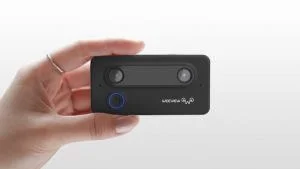
SID CameraMost video producers are still trying to figure out how to get over the 4K hump. But video technology waits for no one, and the true cutting edge these days may not be in just adding more pixels to a high-definition image, but instead, taking viewers to potentially new realities and dimensions. That’s exactly what the new SID camera is looking to achieve:
At last, shake-free 3D content creation that’s easy and affordable for EVERYONE!  Weeview’s SID offers the BEST immersive and stereoscopic viewing experience. Don’t just record the special memories, start re-living the experience in unbelievable life-like 3D format.

Here are some key features of the SID video camera:

  • Immersive 3-D camera with stereoscopic imaging effect
  • Adjustable parallax setting allows users to get different stereoscopic effects
  • 3-D video can be used for virtual reality presentations
  • 3-D video live streaming capability via connection to smartphone
  • Smart highlight feature provides close ups on certain parts of the video, allowing you to focus on areas that you are interested in without losing the complete shot
  • Auto-follow technology keeps video centered on the main subject of the shot
  • Create shake-free 3-D video with the SID camera kit, also makes it easier to connect the camera to a smartphone for video streaming
  • Create, share, and edit SID videos using the Weeview app for Android and iOS

The SID camera is being launched thru Kickstarter (see the link at the top of this article). The campaign has already reached its funding goal. SID camera packages can be had for a $179 contribution, with upgraded packages available for larger contributions.


Get Free Audio Plugins from Plugin Alliance


Plugin Alliance LogoThe only thing better than new audio production plugins is FREE new audio production plugins. Plugin Alliance currently has six free audio plugins posted on its website, available as free downloads. Here’s a rundown of these plugins:

  • Brainworx bx_cleansweep V2: A plugin that provides hi-pass and lo-pass filtering in one place. From Plugin Alliance: “Brainworx Anti-Crush technology uses analog style filter curves that eliminate common digital sound problems like harshness and aliasing. This advanced filter design is taken from their pro mastering EQ, bx_digital V2. First order filters (6 dB per octave) guarantee an extremely musical-sounding filter set, and a unique joystick interface (taken from the bx_hybrid) gives you fast and intuitive control.”
  • Brainworx bx_subfilter: This plugin helps to deal with low-end frequencies that may be troublesome within a mix. From Plugin Alliance: “Polishing your mix’s low end can be tricky. Bass DI tracks can sound mushy, and kick tracks can lose their ‘pop.’ Sometimes everything below 100Hz can become such an undifferentiated soup of noise that you just don’t know where to start! Start here: The bx_subfilter is just the ticket for adding clarity and definition to tracks that have troublesome low frequencies. There are lots of expensive and complicated EQ plugins out there, but when it comes to shaping your low end, the bx_subfilter is unique for its ease and simplicity. With just a few quick adjustments to its four-knob interface, you can breathe new life into those 808s that have been muddying your mix.”
  • elysia niveau filter: Another plugin that helps with EQ. From Plugin Alliance: “The niveau filter provides two basic controls: EQ gain and EQ frequency. Together, they allow you to change the proportions between high and low frequencies on your tracks. The principle is similar to a pair of scales. The ‘EQ Freq’ knob sets the center frequency. The ‘EQ Gain’ knob controls the amount of EQ applied to your signal. When the EQ Gain knob is at 12 o’clock, there is no EQ applied. When you turn the EQ Gain knob to the right, you boost frequencies above the center frequency while simultaneously reducing frequencies below the center frequency. When you turn the EQ Gain to the left you boost frequencies below the center frequency while simultaneously reducing frequencies above the center frequency.”
  • SPL Free Ranger: This plugin is also EQ-centric. From Plugin Alliance: “The Free Ranger is based upon the Full Ranger-EQ from SPL’s EQ Rangers series. It features four very useful bands: The 16 kHz center frequency band is great for adding very pleasant brilliance; the 1.8kHz center frequency band really brings out lead vocals and guitars or reduces harshness; the 150 Hz center frequency band adds warmth, making tracks fuller & fatter, while the 40 Hz center frequency band adds that sub thump or reduces rumble.”
  • Brainworx bx_rockrack V3 Player: A guitar amp simulation plugin. From Plugin Alliance: “The bx_rockrack V3 Player is your ticket to getting stellar guitar tones for absolutely free! By including the same eight immaculate guitar amp simulations as the fully-featured bx_rockrack V3 implemented across 26 professionally designed presets, bx_rockrack V3 Player gives you access to some of the best tones Brainworx has to offer.”
  • Brainworx bx_solo: A comprehensive soloing and muting plugin. From Plugin Alliance: “bx_solo contains a stepped M/S Stereo Width Control, so you can get a sense of how M/S technology can be used to expand the stereo width of tracks already recorded. Try it out on subgroups, FX returns, keyboards, or any stereo track that you’d like to spread out. A great pro trick is to use M/S processing on a rock guitar subgroup: just set the stereo width to 150% and the guitars will jump out of your speakers!”

These plugins are available for free from Plugin Alliance for anyone with a free Plugin Alliance account.


GMF Music Previews the Ai ProTube Preamp/DI Box


ProTubeDespite the rise in solid state digital gear that’s been prominent in audio and music production over the last few decades, many musicians and audio engineers still long for the warm sound that only a real tube-based amplifier can provide. But most tube amps are large, heavy, bulky things that can be cumbersome to work with, especially in situations that may require a minimalist setup in terms of gear. That’s where the new Ai ProTube preamp/DI box from GMF Music comes in:
Geared towards the acoustic instrument market the Ai ProTube has a real “tube” that will make any acoustic instrument sound warm and inviting with no unwanted signal compression. This isn’t just a tube simulation circuit; it is the real thing with a 12AX7 tube circuit.

And:

The GMF Ai ProTube is an acoustic preamplifier, direct box, and all around solution for connecting your acoustic instrument into a sound source. If you don’t have a built-in pickup on your guitar or other acoustic instrument, no problem we will include a handcrafted transducer pickup to your order.

A few of this device’s features:

  • Can be used as a preamp for an acoustic instrument with a built-in pickup or external pickup
  • Can be used as a DI box to connect to a PA system
  • The Ai ProTube is a high quality acoustic amp without the power amp or speakers, making it easy to connect an instrument to a power amp or PA system
  • Add external effects with the built-in effects loop

GMF Music is currently in the planning stages for launching the Ai ProTube thru Kickstarter. Sign up for updates or contact GMF Music directly here.


Small Batch Audio Crowdfunding Campaign Scheduled for May 26th


Last month, we covered the announcement of the new Podcaster Pro audio-production device being developed by Adam Curry’s Small Batch Audio. At the time, we mentioned that the product would be launched thru an online crowdfunding campaign. But, the date of the campaign was not yet known.

In an e-mail update sent today, Small Batch announced that the crowdfunding campaign will go live on Friday, May 26th:

We’ve locked in the kickoff date of our crowdfunding campaign for the Podcaster Pro to Friday May 26th 2017 and we’re very excited! I hope you are as well.

The e-mail also gave some information on how the Podcaster Pro will be priced during the campaign:

As the Indiegogo campaign starts the first people supporting the campaign will have an opportunity to lock in the $497 early bird level. After 48 hours the early bird level will be locked and a higher price level will be available.

The e-mail also notes that prospective buyers who are already on the Small Batch Audio mailing list will be able to put in special requests for the $497 early-bird price, even after early-bird pricing is no longer available. It’s unclear if that offer is only available to those already signed up for the list, or if it’ll be repeated for those who sign up for the list prior to the launch of the campaign on May 26th.


Livestream Rounds Up Product and Feature Releases for Q1 2017


Livestream logoMedia-streaming platform Livestream was pretty busy during 2016. And it looks like the service isn’t letting up during 2017. Livestream recently posted a roundup of all of the things it’s released so far this year. This includes new software and hardware products, as well as updates to some of Livestream’s existing products. Here are some highlights from Livestream’s roundup:

Livestream Simulcasting: Described by Livestream as, “one dashboard to rule them all,” the simulcasting service allows users to stream to multiple platforms from their Livestream accounts. That includes Facebook Live, YouTube Live, Periscope, Twitch, and more. Livestream’s Simulcast service also provides in-depth analytics so users can see which platforms are the most popular with viewers.

HTML5 Player: We wrote earlier this year about Livestream’s new HTML5 player and it looks like the company has delivered on the promised player. The player is a much-needed upgrade from Livestream’s previous Flash player. Livestream is still working on getting the HTML5 player on all possible platforms. The new player is currently available only on the Chrome web browser.

Studio 4.2: We also covered the launch of Livestream’s latest “studio in a box” product, Studio 4.2. Since the release of Studio 4.2, Livestream has added new features to the device, including Dropbox integration, making it easier to bring remotely-stored media into the device.

Dontions for Livestream Subscribers: Livestream broadcasters can now accept donations from viewers during live presentations. This service has been implemented by a wide variety of organizations, including houses of worship and nonprofits to independent artists and creators.

For more information on all of Livestream’s achievements so far this year, check out this Livestream blog post.


DPA Introduced 4-Way Microphone Clip


DPA Microphones introduced a 4-way d:screet microphone clip at NAB 2017. Popular among broadcast journalists, churches, television and film productions, DPA Microphones’ d:screet microphone series is perfect for any situation where you need a completely hidden microphone. DPA d:screet Lavalier Microphones deliver clear, clean and sonically pure sound in a wide range of applications.

Now, this versatile and durable microphone can be paired with the new SCM0013-B 4-way clip. The new 4-way clip offers fast and secure mounting – upwards, downwards, left and right – and has multiple cable management mounting options. The clip offers three points for cable attachment, providing the user with the flexibility they need to move around.

The holder is used with omnidirectional microphones that pick up sound perfectly, no matter which direction the microphone is placed in. The rear cable controls run behind clothes and minimize the mic’s visual appearance.

The clip is available in black, only. It does not fit d:screet Heavy Duty mics. If you need a clip for a Heavy Duty, choose the SCM001 Miniature Microphone Clip for Heavy Duty Microphones.

The SCM0013 4-way Clip fits the following microphones:

  • d:screte Slim 4060 Omnidirectional Microphone, Hi-Sens
  • d:screte Slim 4061 Omnidirectional Microphone, Lo-Sens
  • d:screte 4060 Omnidirectional Microphone, Hi-Sens
  • d:screte 4061 Omnidirectional Microphone, Lo-Sens
  • d:screte 4062 Omnidirectional Microphone, XLo-Sens
  • d:screte 4063 Omnidirectional Microphone, Lo-Sens & DC
  • d:screte 4071 Omnidirectional Microphone, Low-cut, Presence Boost

Sennheiser Introduced HDV 820 Headphone Amplifier


Sennheiser introduced the latest product in its audiophile range, the fully balanced headphone amplifier HDV 820, at the Tokyo Headphone Festival. The HDV 821 builds on the accomplishments of the audio specialist’s first-ever digital headphone amplifier, the acclaimed HDVD 800. The new HDV 820’s enhanced, higher resolution and ultra low distortions components open up a whole new listening experience for the most demanding audiophiles.

The HDV 820 amplifier allows for unadulterated listening enjoyment, thanks to its improved fully balanced signal processing and extremely low harmonic distortion. It provides an incredibly pure sonic experience for every audio source.

The all new digital section of the HDV 820 is powered by a high-quality ESS SABRE32 digital-to-analog converter in a completely balanced topography. The DAC offers unequalled dynamic range, ultra-low distortion and unmatched audio clarity. It preforms at a PCM resolution of 32 bits and a sampling rate of up to 384 kHz and up to 12.3 MHz in the DSD mode.

The analogue section and the power amplifier of the HDV 820 derive from the existing HDVD 800, but in a carefully improved version. Its multiple audio outputs include an unbalanced output through an XLR3/6.3mm combined NEUTRIK socket, one balanced XLR4 and two balanced 4.4mm Pentaconn sockets. Due to its diameter of 4.4mm, it is suitable for mobile and stationary applications. The unmodulated, very low contact resistance of the Pentaconn Connection leads to a distortion-free signal transmission. The HDV 820 delivers superlative performance using digital sources, whether optically, coaxially or via USB, as well as analogue sources via balanced (XLR) and unbalanced (RCA) inputs.

Designed and manufactured in Germany, the HDV 820 has been created to be a perfect companion to Sennheiser’s audiophole headphones. The amplifier delivers a particularly impressive acoustic performance when paired with Sennheiser’s acclaimed HD 800 S headphones. This harmony is reflected by a new anodized black finish with white LED lights, a design that complements the subtle elegance of the HD 800 S.


Blackmagic Design Introduced UltraStudio HD Mini


Blackmagic Design has introduced the UltraStudio HD Mini, the world’s first portable Thunderbolt 3 capture and playback solution designed for archiving, edit monitoring, streaming, and live broadcast graphics. UltraStudio HD Mini is in stock and available now from Blackmagic Design resellers worldwide for $495.

Blackmagic Design took a different direction with UltraStudio HD Mini, by including some new connections that people needed, and removing ones that people don’t use anymore (like analog out).

People are capturing from older analog and digital broadcast decks for archiving content to modern digital media files. People also want to run live graphics into switcher with fill and key and of course, we often need to get high quality monitoring in HDMI and SDI when editing and color grading and need perfect AV sync. It also works with Open Broadcaster software for 1080p streaming.

UltraStudio HD Mini has been designed to do those tasks well. Blackmagic Design fit it all into the small Teranex Mini sized design. It is Thunderbolt powered so you don’t need to connect it to a power supply. You can power it from your laptop battery.

If you add the optional Teranex Mini Smart Panel you also get video, audio meters and status, including a new frame buffer indicator to assist in evaluating disk performance on broadcast systems. You can also rack mount multiple units using the Teranex Mini Rack Shelf. The optional Teranex Mini Smart Panel is $85.

UltraStudio HD Mini features professional broadcast quality connections that include 3G-SDI, analog YUV and composite NTSC/PAL video inputs, along with a reference input. There are also two 1/4” audio connections for analog audio input that work with balanced HiFi sources. In addition, UltraStudio HD Mini can remote control professional broadcast decks using the built in RS-422 connection. For output, you get dual link 3G-SDI with fill and key, and an HDMI connection for monitoring video with a big screen television.


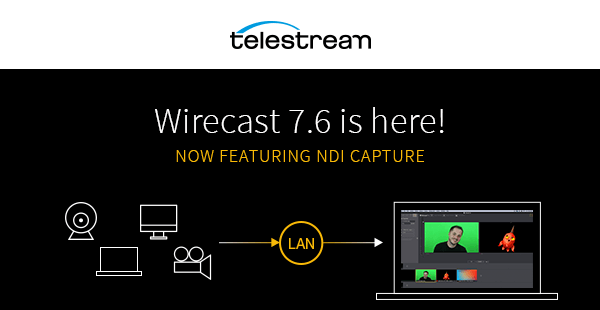
Telestream Wirecast 7.6 is Here!


Telestream has released Wirecast 7.6, the newest version of Wirecast. You can upgrade to this version from the Telestream website.

Produce your live shows in a whole new way – workgroup production is now possible by using and sharing sources from your entire network. Now it’s easier than ever to bring IP video sources into Wirecast over your local network. Wirecast will now automatically detect and receive any video or audio that is broadcast via Newtek’s high-quality, low-latency NDI protocol.

Add high-resolution, live video from cameras, Adobe Creative Cloud apps (such as Adobe Character Animator) graphics (such as NewBlue titles), scoreboards and screen capture sessions, directly into your Wirecast stream.

Here is a list of improvements in Wirecast 7.6:

  • Capture NewTek NDI sources
  • Fixed RSS feeds not working properly in the Text widget
  • Fixed a crash occurring as a result of using a large number of CFF sources (i.e. Titles)
  • Fixed an issue where Toggle Broadcast for Periscope was greyed out
  • Changed Periscope API for “Should Tweet” to “Should Not Tweet”
  • Fixed a crash that could occur when a YouTube Event ended by closing an unsaved document
  • Fixed an issue where the cursor exits the Places field after each key stroke in the Facebook destination
  • Added a better error message if Facebook prevents creating a stream due to broadcasting copyrighted material
  • Added more encoder presets for Facebook destination
  • Display settings for previously scheduled Facebook events
  • Fixed an issue where deleting an encoder from Periscope’s dashboard would break authentication until restarting Wirecast
  • Fixed issues when performing Smooth transition via Keyboard Shortcuts set to Shots