Cerevo Announces LiveShell 2 Video Streaming Device


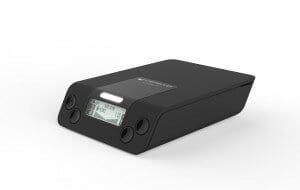
LiveShell 2The market for all-in-one live video streaming devices has really taken off over the last year. It’s definitely easier than ever to create, capture, encode, and stream live video. The latest device in this ever-expanding vertical was just Announced by Cerevo. It’s named LiveShell 2 and it’s the followup to the company’s original LiveShell product.

LiveShell 2 can broadcast video and audio encoded in H.264+AAC, with a resolution of 720p and a bitrate of up to 10Mbps. Streaming is possible via wired LAN or Wi-Fi (IEEE 802.11a/b/g/n/ac). The addition of 5GHz Wi-Fi support means stable streaming is possible even in bandwidth-congested areas.

LiveShell 2 doesn’t require a computer in order to operate. You can connect a camera direct to LiveShell 2 via HDMI. Also, LiveShell 2 supports several live streaming services, such as Ustream, YouTube Live, Twitch, and RTMP servers. LiveShell can also be used in Local Mode which allows LiveShell 2 to broadcast sound and video to a specific RTMP server in a completely closed LAN environnment. In addition, the RTSP mode can be used for direct delivery of video using the LiveShell 2 as a server.

LiveShell 2’s internal rechargeable Li-po battery provides up to 3.3 hours of broadcasting time. It can be recharged via the included A/C adapter or a mobile USB battery charger.

The Cerevo LiveShell 2 is expected to retail for $299. It is not yet available for purchase.


Newtek Announces NDI Protocol for Video Production


NewTek LogoNewtek, the Texas-based technology company best known for its Tricaster line of products, recently announced the development of a new protocol for connecting video equipment to Ethernet networks. The protocol is named Network Device Interface (NDI). From the Newtek press release:

…a new open standard for live production IP workflows over Ethernet networks. NDI allows multiple video systems to identify and communicate with one another over IP, and to encode, transmit and receive many streams of high quality, low latency, frame-accurate video and audio in real-time. This new protocol can benefit any network-connected video device, including video mixers, graphics systems, capture cards, and many other production devices.

NDI will be available as a free, open-source SDK in Q4 of 2015. Newton expects many software developers and hardware manufacturer will begin adopting NDI, helping to ensure it’ll become the new standard for connecting video equipment to IP networks. Also, the NDI protocol should work with most existing video applications and hardware products from the beginning. NDI is also compatible with SDI equipment as well as many other established network technologies.

This should prove to be a real game changer for media producers going forward, as it’ll improve video production workflows and make it easier to integrate different types of equipment in different locations.


Tri-Caster Mini Now Available in HD-SDI and HDMI Models


NewTek TriCaster Mini family got biggerNewTek has announced that the Tri-Caster Mini family just got bigger. The most portable complete multi-camera production system just got more professional. Tri-Caster Mini is now available in HD-SDI and HDMI models.

The Tri-Caster Mini family is great for people who want to create videos without having to lug around a lot of complicated equipment. It is designed to be easy to use for those who are amateurs, but is good enough to attract professionals as well. The HDMI version of the Tri-Caster Mini lets users transform their ordinary presentations into engaging multimedia content that looks like network-style TV.

Tri-Caster Mini provides a solution that includes a complete suite of tools for creativity, control, and content publishing, all in one turnkey package. Plug in some cameras, a mouse, and a keyboard and you can create video content and stream it live in minutes.

The Tri-Caster Mini HD-4sdi gives customers a choice between SDI I/O and the highly popular ultra-portable HDMI version of Tri-Caster Mini. You can choose between the two based upon your preference.

It includes an integrated display screen and system storage capable of recording approximately 45 hours of footage. This product is now available for $9,995 USMSRP. International pricing may vary.


Shure Pushes for Dedicated Wireless Spectrum in UK


shure logoAlmost anything from common household toasters to large commercial audio systems can be wireless these days. And while this may simplify some things in terms of setup, and it does offer a certain level of convenience, it also creates a problem with signal congestion across the wireless spectrum. And when wireless frequencies begin to interfere with each other, this can cause the products that depend on those frequencies to malfunction. In an attempt to stem the tide of frequency encroachment, microphone manufacturer Shure is pushing the UK government to devote a portion of the wireless spectrum specifically to audio gear.

Shure believes that the best spot on the wireless spectrum for this type of gear is UHF bands IV and V or 470 – 854MHz. In recent years, much of this spectrum became available as UK television broadcasters switched from analog to digital. The UK government has already given the 700 MHz and 800 MHz bands over to mobile phone companies for use in their 4G networks. A spokesperson from Shure was quoted as saying that this wireless spectrum should be treated like any other kind of natural resource, and that it’s necessary for the government to put some kind of controls in place so all of the spectrum doesn’t get completely used up for things like cell phones. Preserving this part of the spectrum for wireless microphones and related devices would ensure that future live events can happen without any worry of electromagnetic interference ending the show.


PreSonus Releases Studio One 3 Prime for Free


PreSonus Studio One 3 PrimePreSonus is offering its Studio One 3 Prime audio and music production software for free. It is a feature-rich digital audio workstation that comes with some bundled content. Those that are new to audio production, and those who are seasoned audio producers who are unfamiliar with PreSonus, may want to check out this free version of PreSonus’s cross-platform DAW.

Unlike other free versions of software, this one does not time out, does not have a nag screen, and does not limit the number of songs that you can create. It is based on a the full version of Studio One.

In addition, this deal comes with bundled content. The Presence XT Sample ships with a 1.5GB library. It gives you access to 9 PreSonus Native Effect plugins (including Ampire, Beat Delay, Chorus, MixVerb, and more.)

Studio One 3 Prime offers an elegant single-window work environment that has drag-and-drop functionality and multi-touch support. (A multi-touch enabled monitor is required for touch operation). It comes with unlimited audio tracks, MIDI buses, and FX channels. It also has the new Presence XT expandable sampler with essential sound library.

Studio One 3 Prime requires Mac OS X 10.8.5 or higher, and requires an Intel Core 2 Duo processor. Intel Core i3 or better is recommended. On a PC, the software requires Windows 7 x64/x86 SP1 + platform update, or Windows 8.1 x64/x86. It also requires an Intel Core 2 Duo or AMD Athlon X2 processor. An Intel Core i3 or AMD Athlon X4 is recommended.

Studio One 3 Prime requires 4GB Ram (but 8GB or more is recommended). It also requires 278 MB hard-drive space for the application, and 1.56 GB hard-drive space for additional content. Monitors must have 1366 x 786 resolution, and a high-dpi monitor is recommended.


Flickr Pro is Back!


Flickr logoFlickr has announced that Flickr Pro has returned and that it comes with some improvements since the previous version. Their blog post that announces it is titled: Hey there Flickr Pro, nice to see you again!

The new Flickr Pro is available for both existing members of the Flickr community, and those who are brand new to it. It offers improved stats. The Pro badge is making a return. Those who subscribe to Flickr Pro will get a discount on Adobe software. The things that professional photographers may have been missing since Flickr Pro went away are coming back.

The Flickr blog gives more details about what Flickr Pro includes. Subscribers get new and improved stats, including improved navigation for viewing data on your photos. These improved stats will provide better insight on your most popular and impactful photos.

Those who subscribe to Flickr Pro will have a Pro badge highlighted on their accounts. They also will have an ad-free experience on Flickr, on when they view their own photos and also when they view everyone else’s photos.

Some Flickr Pro subscribers, those who subscribe to the $49.99/year plan (instead of the $5.99 monthly plan) will receive a 20% discount on Adobe Creative Cloud Photography plan. That same group also will receive free standard shipping (within the United States) on Flickr merchandise, or 50% off international shipping. (Those shipping deals require a $25 minimum purchase).

Flickr members who already have an existing Pro account will be automatically upgraded to the new Pro. You will keep your existing pricing and unlimited space. Existing Flickr Ad-Free account holders will be automatically upgraded to the new Flickr Pro with no change in price or renewal date.


Edit and Share HD Footage with GNARBOX


GNARBOX logoGNARBOX is the world’s first mobile solution for viewing, backing-up, editing, and sharing your HD footage from any GoPro HERO or DSLR camera. It reduces the amount of equipment that you need to carry with you. All you need is your camera, your phone, and the GNARBOX.

GNARBOX is currently on Kickstarter. At the time I am writing this blog, it has 24 days to go, and it has already been fully funded.

Backup your camera right from the field. Upload up to 128 GB of full resolution footage from any camera to the GNARBOX. It is pocket sized and weatherproofed.

Next, connect your phone to the GNARBOX Hotspot and open the GNARBOX app. This lets you instantly view HD photos and videos, and securely backup your HD photos and videos at up to 4GB per minute. It also will auto-organize your content by date, time, and GPS. Use GNARBOX to quickly create highlight reels or touch up your photos.

When you are done, you can share your edits at full resolution. GNARBOX can deliver your footage to the world (up to 4K video and RAW photos). The GNARBOX can share your photos with your phone and three other devices. You can also post photos and videos on Instagram, Facebook, Twitter, YouTube, Vimeo, or put them into your Dropbox. You can make a highlight reel of your day and share it with friends and family.


IK Multimedia Announces Firmware Update


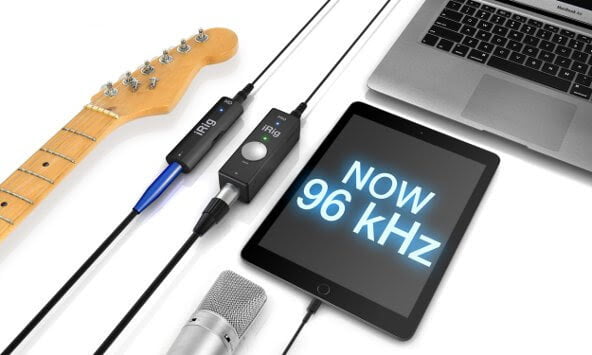
IK Multimedia firmware updateIK Multimedia has announced a 96kHZ firmware update for iRig PRO and iRig HD. Users can now get ultra-high quality 24bit/96kHz recording studio sound anytime and everywhere. The update is complementary.

The new firmware update enables high resolution 24-bit/96kHz audio sampling for its iRig PRO and iRig HD mobile audio interfaces. At double the original 24-bit/48kHz sample rate, it makes these ultra-compact mobile interfaces sound even more clean, nuanced, and transparent by offering the utmost in professional recording quality.

Use it anywhere and anytime. Its an ideal feature for professionals and advanced home studio enthusiasts who won’t settle for anything less than the best sound possible. The firmware update is offered at no-cost for all existing iRig HD and iRig PRO users.

To update, existing users just need to log into their user account on the IK Multimedia web site, download the firmware updater for their computer OS and then follow the simple installation instructions. Both the PC and Mac version of the Firmware Updater are available now.

IK Multimedia is also offering a $20 discount on the list price for iRig PRO and iRig HD through the entire month of July of 2015. The iRig PRO is now available for $129.99 and iRig HD is available for $79.99. Both can be purchased from music and electronic retailers worldwide and from the IK Multimedia online store.


GoPro HERO4 Session is Light and Durable


GoPro logoGoPro’s new HERO4 Session is the smallest, lightest, most convenient camera yet. The catchphrase for this camera is “So small. So stoked.” It is designed for athletes who want a simple way to film themselves in action. HERO4 Session will be available for purchase on June 12, 2015.

HERO4 Session features a rugged and waterproof design and an easy one-button control. It is a small, cube shaped GoPro that is easy to wear and mount. It weights just 2.6 ounces (74g). An athlete can attach it to a helmet, a bike, a kayak, or whatever else they can think of. The HERO4 Session will also be useful for filming family vacations.

Use HERO4 Session to capture video in a variety of resolutions. The video format is h.254 codec and .mp4 file format.

The camera can record a continuous video loop that overwrites itself until you press the shutter button to stop it and save. It has a SuperView feature that can capture a tall perspective (4:3), which allows you to capture more of yourself and your surroundings in the shot. That content is then dynamically stretched to a wide perspective (16:9) for full, immersive, widescreen playback.

You can use the camera to take burst photos. It can capture up to 10 photos in 1 second. Or, take a time lapse photo at 0.5, 1, 2, 5, 10, 30, and 60 seconds.

It comes with specially designed mounts and accessories that give you more mounting options. There is a Low-Profile Frame that sits low on a table or other surface. The Standard Frame can be used with GoPro mounts to create a wide array of ultra compact gear setups. The Ball Joint Buckle lets you move the camera around without having to stop and unmount the camera.

There are two different editions of this new GoPro: HERO4 Session, and HERO4 Session/Surf. The HERO4 Session comes with 1 curved mount and 1 flat adhesive mount, while the HERO4 Session/Surf comes with a surfboard mount, an FCS plug mount, and a camera tether.

Both the HERO4 Session and the HERO4 Session/Surf have a 1030mAh lithium-ion rechargeable battery. Each comes with a micro USB cable, a standard frame, and a low-profile frame.

The HERO4 Session, and the HERO4 Session/Surf are each priced at $399.99. They will be available for sale as of July 12, 2015.

https://youtu.be/pzMRr5eTtho


Solocam Combines a Selfie Stick with a Microphone


SolocamLooking for a really simple way to record audio and video content for your podcast anywhere you go? The Solocam might be your solution. It combines a selfie stick with a hand held microphone. At the time I am writing this blog, Solocam has 28 days left in their Indiegogo campaign.

Solocam feels like the natural extension of the selfie stick. Adding a microphone to the selfie stick results in a recording studio in the palm of your hand. Bring Solocam to an event, and you can film content for your podcast all by yourself!

The Solocam has a dynamic microphone, with a frequency response of 50hz to 15,000hz. The audio quality is 48khz / 24bit. It has a built-in spherical wind and pop filter. The selfie stick portion of Solocam has a holder that can safely hold smartphones, GoPros, and cameras. The microphone is designed to be comfortable to hold in your hand.

The Solocam App comes free with the Solocam. It includes a teleprompter, which podcasters can use to read from text while recording a video. (Or, you can use it to read song lyrics while you record a karaoke video). The app can enhance your voice and audio quality. You can also add special effects and video filters while you are recording.

The Solocam App lets you switch between the front and back camera on your smartphone. This could be useful if you are at an event and want to report on it and show what is going on at the same time. Solocam is working with its partners to enable live video broadcasting from within the Solocam app.